
RTO caps how long a system can stay down. RPO caps how much data you can afford to lose. One is measured forward from the moment something breaks; the other is measured backward, into the data you already had. Get them confused and you'll build a recovery plan that protects the wrong thing.
- RTO drives your recovery architecture — the servers, failover paths, and automation you need to hit a downtime ceiling.
- RPO drives your backup and replication frequency — how often you copy data and where you send it.
Both numbers have to be set per workload, not once for the whole company, and both have to be tested. A target nobody has ever tried to hit is a guess dressed up as a plan.
TL;DR:
- Setting RTO below the Maximum Tolerable Downtime with a safety buffer ensures realistic recovery times aligned with business needs.
- RPO should be based on actual backup and replication schedules, verified through testing, rather than assumptions about backup frequency.
- Critical applications with revenue impact require near-zero RPO and RTO, often demanding expensive synchronous replication and active-active setups.
- Regular testing of recovery processes reveals gaps between planned and actual recovery times, which are usually caused by untested manual steps or outdated procedures.
- A Business Impact Analysis helps determine achievable targets by analyzing downtime costs and data re-creation expenses for each workload.
Table of Contents
- What RTO vs RPO Actually Means for Your Systems
- RTO vs RPO Side by Side: What Drives What
- How to Set RTO and RPO With a Business Impact Analysis
- Setting Realistic Targets by Application Tier
- Closing the Gap Between RTO and Actual Recovery Time
- Weighing Technology Costs Against Aggressive Targets
- How Mindpodtech Approaches RTO and RPO Planning
- Why Most Recovery Targets Fail on the First Real Test
- Get a Free Assessment of Your Recovery Readiness
- Key Takeaways
- Sources
- FAQ
What RTO vs RPO Actually Means for Your Systems
Recovery Time Objective is the maximum downtime a workload can tolerate before the business damage becomes unacceptable, measured in minutes, hours, or days. Recovery Point Objective is the maximum data loss you can tolerate, measured backward from the failure to the last good copy of your data. If your database dies at 2:00 PM and your RPO is one hour, you're accepting that everything entered since 1:00 PM might be gone.
The teams that own these numbers are usually different, and that split matters more than most org charts reflect.
- Infrastructure and recovery teams own RTO. They build the failover clusters, DR sites, and automation scripts that determine how fast a system comes back online.
- Backup and storage teams own RPO. They configure replication schedules, snapshot frequency, and retention policies that determine how much data survives.
A concrete example makes the split obvious. An e-commerce checkout system might need very low RTO and RPO values because customers won't wait longer and losing even a few orders is a compliance and revenue problem. An internal reporting dashboard might tolerate longer RTO and RPO values, because it is not critical to be available immediately and data loss within a day may be acceptable.
Pro Tip: Ask each application owner one question: "If this went down right now, what would you notice missing first, time or data?" The answer usually reveals which metric actually matters more for that workload.
RTO vs RPO Side by Side: What Drives What
| RTO | RPO | |
|---|---|---|
| Measured | Forward, from failure to restoration | Backward, from failure to last good copy |
| Primary owner | Infrastructure/recovery team | Backup/replication team |
| What it drives | Failover architecture, automation, staffing | Backup frequency, replication mode, snapshot cadence |
| Main cost driver | Redundant infrastructure, orchestration tools | Storage, bandwidth, replication licensing |
A tighter RPO with a looser RTO makes sense for something like financial transaction logs, where you can't lose a single record but a few hours of manual reconciliation before systems are back up is survivable. The reverse, a tight RTO with a looser RPO, fits a customer-facing website where uptime matters more than the last ten minutes of form submissions.
The most common mistake in setting these targets isn't picking the wrong number. It's assuming the backup schedule equals the effective RPO without verifying it. An hourly backup job that takes 45 minutes to complete and another 15 minutes to verify doesn't give you a one-hour RPO. It gives you something closer to two hours once you account for replication lag and completion time. Teams that never test this gap discover it during a real outage, which is the worst possible time to find out your safety margin was smaller than you thought.
- Don't confuse "backup runs hourly" with "we can only lose an hour of data."
- Don't set RTO/RPO once at the company level and apply it to every application.
- Don't skip validation because the numbers "look reasonable" on paper.
How to Set RTO and RPO With a Business Impact Analysis
A Business Impact Analysis is the only defensible way to set these numbers, because it forces you to price the pain instead of guessing at it. TechTarget's guidance on BIA-driven target setting lays out the logic clearly: RTO has to sit below the Maximum Tolerable Downtime, with a buffer, or you're setting a target that still lets the business fail.
- Calculate cost per hour of downtime. Include lost revenue, contractual penalties, and labor cost for idle staff, plus softer damage like customer churn and reputational hit.
- Determine your data-change rate. How much data does the workload generate per hour, and is any of it re-creatable from another source? Data you can rebuild from a source system needs a looser RPO than data that only exists in one place.
- Map Maximum Tolerable Downtime to RTO, with buffer. If the business can survive 6 hours down before real damage sets in, don't set your RTO at 6 hours. Set it at 4, so you have margin when the recovery runs long.
- Convert data-change rate and recreation cost into RPO. If losing an hour of data means re-entering 200 orders manually, price that labor and compare it to the cost of tighter replication.
- Validate against real technology options, estimate cost, and iterate. Take the draft targets to your infrastructure team, price out what hitting them actually requires, and revise with business stakeholders until the number and the budget agree.
The output of this process should be a number every stakeholder signed off on, not a number IT picked because it sounded safe.
| Point | Details |
|---|---|
| RTO ceiling | Set RTO below Maximum Tolerable Downtime with a buffer, not equal to it. |
| RPO from data cost | Price the labor to re-create lost data before setting a replication schedule. |
| Business sign-off | BIA targets need approval from application owners, not just IT. |
Setting Realistic Targets by Application Tier
Not every application deserves the same investment, and pretending otherwise is how DR budgets balloon without actually reducing risk. Tiering forces a hard conversation about which systems justify the cost of near-zero downtime and which ones can wait.
- Tier 0/1, mission-critical: near-zero to a few minutes of RPO, and an RTO measured in minutes. Think payment processing, checkout databases, or anything tied directly to revenue in real time. This tier usually requires synchronous replication and active-active infrastructure, which is expensive.
- Tier 2, business-important: RTO in the range of a few hours, RPO between one and four hours. A billing system or internal CRM fits here. Asynchronous replication and warm standby environments are typically enough.
- Tier 3, standard: daily RPO, same-day RTO. Internal analytics dashboards, archived reporting, and low-traffic internal tools belong here. Standard nightly backups usually cover it.
Veeam's tiering framework gives similar ranges, and the pattern holds across most SMB environments: the closer a system sits to revenue or compliance exposure, the tighter both numbers need to be, and the more it costs to get there.
Closing the Gap Between RTO and Actual Recovery Time
Real Time to Achieve, or RTA, is what actually happens when you test a recovery, and it's usually worse than the RTO on paper. Splunk's analysis of RTO versus RPO testing points to the same culprit every time: untested human dependencies. DNS updates, credential access, manual runbook steps nobody automated. An organization sets an RTO of one hour and discovers, mid-drill, that the actual recovery took two.
- Run full failover tests. Actually cut over to the DR environment and confirm the application works end to end, not just that the servers boot.
- Run incremental failover tests. Validate individual components (a database, a load balancer) without a full cutover, useful for testing changes between big exercises.
- Verify backup integrity regularly. Restore a sample backup and confirm the data is usable, not just present.
- Run tabletop exercises. Walk the team through a scenario on paper to surface gaps in the runbook before you ever touch production.
Test cadence should scale with tier, with more frequent testing for critical systems and less frequent for lower priority systems. Success means the measured RTA lands at or under the target RTO; when it doesn't, the fix is usually automation, pre-staged credentials, or a runbook that finally reflects how the system actually works today.
Pro Tip: After every test, publish the measured RTA next to the target RTO, even when it's embarrassing. Teams that hide the gap never get budget approved to close it.
Weighing Technology Costs Against Aggressive Targets
Every technical option for tightening RTO or RPO trades money for speed, and the curve gets steep fast once you push past "good enough." TechTarget notes the cost relationship is roughly exponential: shaving the last few minutes off a recovery target costs disproportionately more than the first few hours did.
- Snapshots give you a point-in-time copy, cheap but with a wider RPO gap between snapshots.
- Asynchronous replication copies data with a short lag, good for most Tier 2 workloads.
- Synchronous replication writes to two locations simultaneously, near-zero RPO, but demands low-latency network links and costs more in bandwidth.
- Continuous Data Protection (CDP) captures every change as it happens, the tightest RPO available, at the highest storage and licensing cost.
- Active-active architecture runs two live environments simultaneously, the fastest RTO possible, but doubles infrastructure spend.
Cost drivers stack up fast: network bandwidth, storage duplication, replication licenses, orchestration tooling, and the labor hours spent testing all of it regularly. AWS's guidance on cloud application targets makes a point worth repeating: cloud vendor tools can help assess whether a component can hit a target, but they don't replace the BIA or the testing cycle, and any SLA you sign with a vendor should state RTO and RPO numbers explicitly, not vague uptime percentages.
How Mindpodtech Approaches RTO and RPO Planning
Setting numbers on a slide is easy. Building the architecture and discipline to actually hit them is where most SMBs get stuck, usually because nobody has the bandwidth to run a proper BIA alongside daily operations. Mindpodtech's disaster recovery advisory work exists for exactly that gap, alongside related service lines in fractional technology leadership, cloud architecture and cost optimization, and security assessment and hardening.
The engagement starts with a free technology assessment that maps your current backup and failover posture against realistic targets for each workload tier.
- The assessment identifies which applications lack tested recovery procedures.
- It flags where backup schedules don't match the effective RPO once completion and verification time are counted.
- It produces a prioritized, plain-language plan the client owns outright.
From there, Mindpodtech executes the plan and runs ongoing validation, so targets don't quietly drift out of sync with reality between annual reviews.
Why Most Recovery Targets Fail on the First Real Test
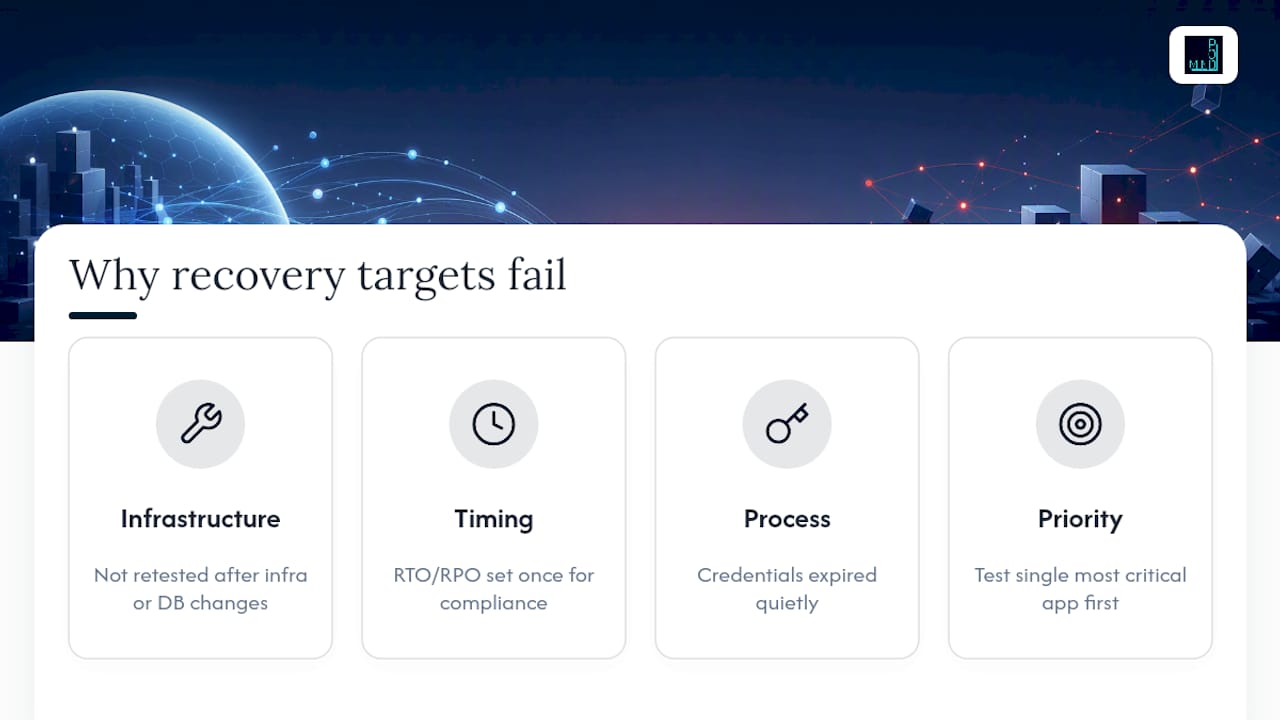
Most companies set RTO and RPO once, during a compliance push, and never touch them again. That's backward. The systems that fail hardest in a real outage are usually the ones nobody re-tested after the last infrastructure change, a new database version, a shifted network path, a credential that expired quietly.
If you take one thing from this guide, test your single most critical application's recovery before you expand testing anywhere else. Everything else can wait a quarter.
— jaras
Get a Free Assessment of Your Recovery Readiness
Most of what breaks a disaster recovery plan isn't the target number, it's the gap between the number on paper and what your infrastructure can actually deliver under pressure. Mindpodtech's free technology assessment closes that gap before an outage does. It maps your current backup and failover setup against the RTO and RPO targets each workload actually needs, then hands you a prioritized, plain-language plan you can act on immediately.

The assessment covers backup and disaster recovery specifically, alongside the cloud architecture and security posture that often sit underneath a failed recovery test. You keep the plan whether or not you move forward with implementation. If your team has never measured the actual gap between your RTO and your RTA, start with Mindpodtech's assessment and get a straight answer before your next outage forces the question.
Key Takeaways
Setting RTO and RPO correctly requires a Business Impact Analysis, per-workload tiering, and regular testing to close the gap between target and actual recovery performance.
| Point | Details |
|---|---|
| RTO measures downtime, forward | RPO measures data loss, backward from the failure point. |
| Run a BIA before setting numbers | Price downtime cost per hour and data recreation cost before picking targets. |
| Tier applications by criticality | Mission-critical systems justify near-zero RPO; standard systems don't. |
| Test to find the RTO/RTA gap | Untested human dependencies routinely push actual recovery time past the target. |
| Get a free readiness assessment | Mindpodtech maps current backup and failover posture against realistic per-workload targets. |
Sources
- RTO vs RPO: What They Mean and How To Set Targets
- Establishing RPO and RTO targets for cloud applications
FAQ
Can RPO be higher than RTO?
Yes. They measure different things on different scales, so a workload can have an RPO of four hours and an RTO measured in minutes, or the reverse, depending on which risk matters more for that specific application.
What is RTO and RPO for dummies?
RTO is how long you can be without a service before it hurts. RPO is how much recent work or data you can afford to lose if things go wrong.
What is RPO and RTO in AWS?
AWS provides tools like Resilience Hub to help assess whether cloud components can meet defined RTO and RPO targets, but AWS itself notes these tools support, rather than replace, a proper BIA and testing cycle.
How do I set RPO and RTO?
Run a Business Impact Analysis to price downtime cost and data-loss cost per workload, tier applications by criticality, set targets with buffer below the Maximum Tolerable Downtime, then validate everything through regular recovery testing. A free assessment from Mindpodtech can benchmark your current setup against these steps.