

Microsoft Entra ID Governance is Microsoft's identity governance solution for automating identity lifecycles, entitlement management, privileged access, and access certification across your tenant. Three outcomes matter most: it enforces least privilege by design, automates lifecycle events that used to eat help desk hours, and produces the evidence auditors actually ask for.
Two capabilities do most of the heavy lifting. Entitlement management packages access to apps, groups, and SharePoint sites into requestable bundles with built-in approval and expiration. Access reviews then force periodic recertification of that access, so permissions do not just accumulate forever.
- Automates onboarding, role changes, and offboarding
- Bundles access into approvable, expiring packages
- Generates audit-ready records of who approved what and when
Pro Tip: If you only remember one thing from this article, remember this: Entra ID Governance automates identity lifecycle tasks and ships entitlement management with approval workflows and expirations baked in. That single capability eliminates most of the manual access reconciliation SMBs still do in spreadsheets.
Key Takeaways
Entra ID Governance succeeds when clean HR data, scoped access packages, and a fixed access review cadence work together, not when any one feature is deployed alone.
| Point | Details |
|---|---|
| Fix HR data first | Clean duplicate records and manager fields before automating lifecycle workflows to avoid propagating errors into access rights. |
| Match review cadence to risk | Run quarterly reviews for high-risk resources like admin roles and annual reviews for low-risk resources. |
| Use PIM for standing admin access | Convert permanent admin roles into eligible, time-limited assignments with approval workflows. |
| Confirm licensing before promising features | Map entitlement management, access reviews, and PIM to your actual Entra ID P1, P2, or Governance license. |
| Start small with Mindpodtech's help | A free Mindpodtech assessment can prioritize your pilot and identify the highest-risk gaps before you scale. |
Table of Contents
- What Is Identity Lifecycle Management in Entra ID Governance?
- How Access Lifecycle Policies and Enforcement Work
- Managing the Privileged Access Lifecycle With PIM
- Setting Up Entitlement Management: Access Packages and Catalogs
- How Often Should You Run Access Reviews?
- Entra ID Governance Licensing and Feature Requirements
- Your Minimal Pilot Plan for Entra ID Governance
- Automating and Integrating Entra ID Governance
- Field Notes: Where Entra ID Governance Rollouts Go Wrong
- Compliance and Regulatory Considerations for Entra ID Governance
- Assessing and Mitigating Identity Risk in Entra ID Governance
- Protecting Identity Data and Privacy Within Entra ID Governance
- Should You Pilot Entra ID Governance or Roll It Out All at Once?
- Get a Free Assessment From Mindpodtech to Plan Your Rollout
- Sources
- FAQ
What Is Identity Lifecycle Management in Entra ID Governance?
Identity lifecycle management starts with a clean source of truth, usually your HR system. Inbound provisioning connectors for platforms like Workday or SuccessFactors feed employee data into Entra ID, and lifecycle workflows react to that data automatically. A new hire record triggers account creation and a welcome package. A department transfer triggers reassignment of group memberships. A termination date triggers offboarding and access removal, often before the employee's last day even ends.
Lifecycle workflows in Entra ID Governance handle three recurring events well:
- Onboarding — pre-provision accounts, licenses, and group memberships ahead of a start date so new employees are productive on day one.
- Role changes — reassign access automatically when a job title, department, or manager field changes in HR data, removing access tied to the old role.
- Offboarding — disable the account, revoke sessions, and strip group memberships the moment a termination is recorded, closing the gap where former employees keep access for weeks.
None of this works if your HR data is messy. Duplicate employee records, stale department codes, and inconsistent manager fields turn automation into a liability instead of an asset. Garbage-in produces garbage-out, and in identity governance that means the wrong people keep access or the right people lose it by mistake.
Pro Tip: Before you automate anything, run a one-time audit of your HR feed for duplicate records, missing manager assignments, and stale department codes. Fixing data hygiene first is a higher-return move than adding more automation on top of dirty data.
How Access Lifecycle Policies and Enforcement Work
Access moves through a lifecycle too: request, approval, assignment, and eventual expiration. Entra ID Governance gives you two main mechanisms for managing that flow, and picking the wrong one for a given resource creates either bottlenecks or sprawl.
An access package bundles resources (groups, apps, SharePoint sites, Teams) behind a request process with defined approvers, eligibility rules, and an expiration date. Dynamic groups, by contrast, assign membership automatically based on attribute rules, which works well for broad, low-risk access but poorly for anything requiring approval or a business justification.
- Use access packages when a resource needs an approval step, a time limit, or cross-department requestability
- Use dynamic groups for baseline access every employee in a category should get automatically, like a company-wide intranet group
- Layer Conditional Access policies on top so sensitive resources require multi-factor authentication or a compliant device regardless of how access was granted
- Export access decisions to your logging pipeline so approvals and expirations are auditable months later, not just at the moment they happen
The distinction matters operationally. Dynamic groups scale cleanly but offer no approval friction. Access packages add friction where you want it, on resources where unauthorized access carries real risk.
Managing the Privileged Access Lifecycle With PIM
Privileged accounts are where a governance gap turns into a headline. Microsoft Entra Privileged Identity Management (PIM) addresses this by making admin roles eligible rather than permanently active. A user activates the role only when needed, for a limited window, often after an approval step.
- Eligible assignments replace standing admin access with a request-to-activate model
- Time-limited elevation caps how long an activated role stays active, typically a few hours
- Approval workflows require a second person to sign off before high-risk roles activate
- Activation alerts notify security teams in real time when privileged roles go live
Run role reviews on a fixed cadence rather than waiting for an incident to prompt one. Regular reviews of Global Administrator, Privileged Role Administrator, and other tier-zero roles are a reasonable baseline for most SMBs. Build PIM activation into your operational runbooks so on-call staff know how to request elevation without breaking glass and calling the help desk.
Pro Tip: Never let the same person approve their own PIM activation request. Separation of duties fails quietly here, and it is the first thing an auditor will check.
Setting Up Entitlement Management: Access Packages and Catalogs
Entitlement management organizes resources into catalogs, and catalogs hold the access packages users actually request. Each package carries its own policy: who is eligible to request it, who approves it, and when it expires. This structure is what lets you delegate access decisions without handing over the keys to your entire directory.
- Create a catalog scoped to a business function, like "Finance Contractors" or "Partner Access," so resources are grouped logically rather than scattered across the tenant.
- Build access packages inside that catalog, each mapping to a specific bundle of groups, apps, or sites a requester actually needs.
- Delegate ownership to the business unit that understands the resource, so a finance manager approves finance contractor access instead of routing every request through central IT.
- Set expiration and recertification rules on the package itself, so access does not outlive the engagement that justified it.
Common pilot scenarios include contractor onboarding (time-boxed access that expires automatically at contract end), partner access to a shared SharePoint site, and cross-department project access that needs a manager's sign-off rather than IT's. Delegating these decisions to business owners scales operations, but it only works if those owners are trained to treat approvals as real decisions rather than a rubber stamp.
How Often Should You Run Access Reviews?
Access reviews are how you catch the access that should have expired but did not. You can target reviews at group memberships, application assignments, role assignments, or the access packages described above, and each review can use a different reviewer model: self-review, resource owner, or the requester's manager. Multi-stage reviews let you chain these, so a manager weighs in first and a resource owner has final say.
Cadence should track risk. High-risk resources, financial systems, admin roles, anything covered by a compliance mandate, deserve regular recurring reviews. Lower-risk resources, like access to a general-purpose Teams channel, can be reviewed less frequently without meaningfully increasing exposure.
- Configure reviews to automatically revoke access when a reviewer does not respond, rather than defaulting to keep access
- Assign a backup reviewer so a single absent manager does not stall an entire review cycle
- Document review decisions somewhere durable, since "we reviewed it" without a record satisfies no auditor
Access reviews can be configured to automatically remove access when reviewers do not respond, which is the single biggest lever for reducing stale access without adding headcount to chase down approvals manually. Microsoft specifically recommends deploying access reviews wherever you have multiple administrators, B2B collaboration, or self-service group management, since those are exactly the conditions where access sprawl happens fastest.
Entra ID Governance Licensing and Feature Requirements
Feature availability tracks your license tier, and getting this wrong is the most common planning mistake we see. Licensing for Entra ID Governance spans Free, Entra ID P1, Entra ID P2, the standalone Microsoft Entra ID Governance license, and Microsoft Entra Suite.
- Entra ID P1 covers Conditional Access and basic dynamic groups but not entitlement management or access reviews at full scope
- Entra ID P2 adds PIM and broader access review capability
- Microsoft Entra ID Governance (as an add-on or standalone SKU) unlocks the full entitlement management and lifecycle workflow feature set
- Microsoft Entra Suite bundles governance with additional identity security capabilities for organizations consolidating multiple point solutions
Guest users bring their own billing model: governance of external identities is typically metered through monthly active user (MAU) billing rather than standard per-seat licensing, so a tenant with heavy B2B collaboration should model guest costs separately before rolling out reviews tenant-wide. Confirm your tenant's current licenses in the Microsoft 365 admin center before promising a feature to stakeholders, and use a trial tenant to validate behavior before it hits production.
Your Minimal Pilot Plan for Entra ID Governance
Assign roles before touching configuration: Global Administrator for initial setup, Identity Governance Administrator for day-to-day policy work, and Privileged Role Administrator for anyone managing PIM. Splitting these prevents one overloaded account from holding every governance lever.
- Enable audit log export to Azure Monitor and set a retention plan, since default retention windows are shorter than most compliance requirements need.
- Pick one narrow use case, like contractor access to a single application, rather than governing the whole tenant on day one.
- Build one catalog and one access package for that use case, with a named approver and a defined expiration.
- Run one full access review cycle on that package before expanding scope, so you learn what breaks with a small blast radius.
Pro Tip: Treat the pilot as a learning exercise, not a launch. If the first review cycle surprises you, that is the system working. Better to discover it on one access package than across two hundred.
Automating and Integrating Entra ID Governance
Lifecycle workflows and provisioning connectors do the mechanical work, but reliability comes from how you test and monitor them. SCIM, LDAP, and SQL-based connectors handle inbound and outbound provisioning to third-party apps, letting a single HR record propagate access changes across your stack without manual re-entry.
- Route audit logs to Azure Monitor or Azure Data Explorer to retain evidence beyond Entra's default windows, which matters for any compliance framework with a multi-year lookback
- Test lifecycle workflow changes in a non-production scope before applying them tenant-wide
- Build a rollback plan for every automation, since a bad rule applied to thousands of accounts is far worse than a bad manual decision applied to one
Retaining logs matters more than most SMBs assume. Auditors rarely accept "the system did it correctly" without a record showing exactly what happened and when.
Field Notes: Where Entra ID Governance Rollouts Go Wrong
Working across SMB environments, the same three failure points show up repeatedly. Poor HR data hygiene tops the list, followed closely by delegated reviewers who approve everything without reading it, and missing telemetry retention that leaves no evidence when an auditor finally asks.
- Run a small data-cleanup project on your HR feed before enabling any lifecycle workflow
- Build a reviewer training checklist so delegated approvers understand what "certify this access" actually means
- Set a minimal Azure Data Explorer retention window that outlives your compliance lookback period, not just Entra's default
If your team is stretched thin, a free Mindpodtech technology assessment can help prioritize which of these three gaps to close first, based on where your actual risk sits rather than a generic checklist.
Pro Tip: Fix data hygiene before you fix automation. Automating a broken HR feed just makes the errors move faster.
Compliance and Regulatory Considerations for Entra ID Governance
Most compliance frameworks that touch identity, SOC 2, ISO 27001, HIPAA for clinics, and various state data privacy laws, converge on the same underlying requirement: prove that access matches business need and that you can demonstrate it on demand. Entra ID Governance is built to answer exactly that question, but the governance features themselves do not automatically satisfy a framework. You still have to configure them to match your specific control set.
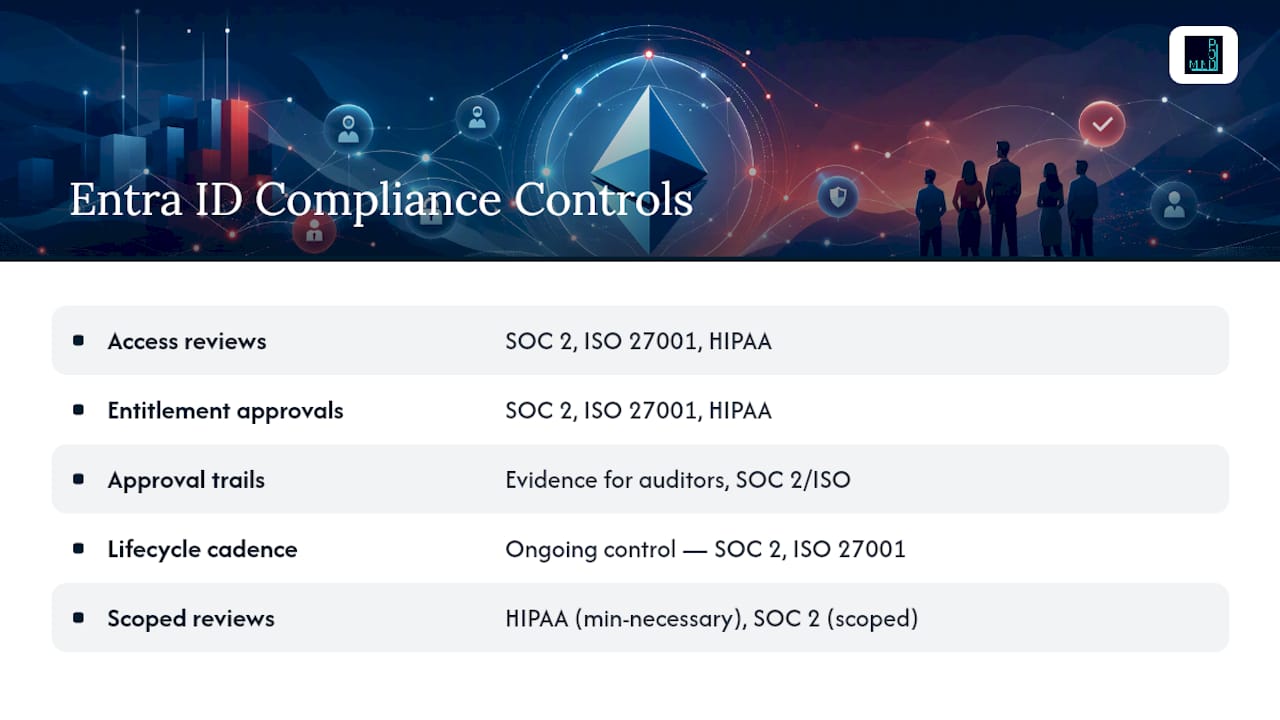
Access reviews generate the recertification evidence auditors ask for directly: who had access, who approved it, and when it was revoked. Entitlement management's approval workflows create a parallel trail for access grants, showing that every package request went through a defined approver rather than an informal Slack message to IT. Together these two features cover most identity-related controls in a typical SOC 2 Type II audit.
Where organizations stumble is treating governance configuration as a one-time compliance project instead of an ongoing control. A control that was correctly configured at audit time but drifted six months later is the same as no control at all in the eyes of most auditors. Build access review cadence and lifecycle workflow monitoring into a recurring calendar item owned by a named person, not a project that closes out once the auditor signs off.
Regulated industries add their own wrinkles. Clinics handling protected health information need to map role-based access packages to the minimum-necessary standard under HIPAA, meaning a nurse's access package should not silently include billing system permissions just because it was easier to bundle them. Law firms with client conflict requirements need access reviews scoped tightly enough to catch a paralegal who retained access to a case file after reassignment. Generic, tenant-wide review cycles miss this kind of nuance. Scope reviews to match your actual regulatory exposure, not just your org chart.
Assessing and Mitigating Identity Risk in Entra ID Governance
Risk in identity governance concentrates in a few predictable places: standing privileged access, orphaned accounts from incomplete offboarding, over-scoped access packages, and guest accounts that outlive the project that created them. A useful risk assessment starts by inventorying where each of these exists today, before you configure a single new policy.

Standing privileged access is the highest-severity item on that list because a compromised admin account with permanent elevation gives an attacker unrestricted lateral movement. PIM's eligible-assignment model directly mitigates this by converting standing access into time-limited, approved activation, which shrinks the window an attacker has to exploit a compromised credential from indefinite to a few hours.
Orphaned accounts, employees who left but whose access lingers, are the second-highest risk in most SMB environments, and they trace directly back to the identity lifecycle gaps covered earlier. A termination event that does not trigger automatic offboarding leaves an active account with no one watching it, which is precisely the kind of account attackers look for because nobody notices when it behaves oddly.
Over-scoped access packages create a quieter but still real risk: a package built quickly during a project deadline often bundles more access than the role actually needs, and that excess quietly persists past the project's end unless a review catches it. This is where access reviews with automatic revocation on no-response function as a risk-mitigation control rather than just a compliance checkbox. Guest accounts deserve the same scrutiny, especially since guest governance carries its own MAU billing model, giving you a financial incentive, not just a security one, to clean up unused external access.
Prioritize mitigation in that order: eliminate standing privileged access first, automate offboarding second, then tighten access package scope through review cycles third.
Protecting Identity Data and Privacy Within Entra ID Governance
Identity governance systems hold some of the most sensitive data in your environment by definition: who works where, what they can access, and every approval decision tied to their name. Treating that data casually undermines the very compliance case governance is supposed to build.
Access request and approval records should be treated as sensitive business records, not throwaway logs. A rejected access request often reveals something about an employee's role change, a contractor's contract terms, or an internal reorganization that has not been announced yet. Restrict who can view raw access review and entitlement management data to the same tier of staff who would see HR records, not the broader IT team.
Data minimization applies to access packages themselves. Building fewer, more targeted access packages rather than a small number of overly broad ones reduces the personal and business data exposed to any single approver. A finance access package should not require the approver to see unrelated HR fields just to make a decision.
Retention policy matters on both ends. Logs need to persist long enough to satisfy audit and compliance requirements, covered earlier through Azure Monitor and Azure Data Explorer retention, but they should not persist indefinitely by default. Set an explicit retention and deletion policy for access review artifacts and approval records, and document that policy the same way you document any other data handling practice, so a privacy audit does not surface identity governance data as an unmanaged exception to your broader data protection posture.
Should You Pilot Entra ID Governance or Roll It Out All at Once?
For most SMBs, pilot first: validate your HR data source, test one access package end to end, then scale deliberately. Reserve a big-bang rollout for hard compliance deadlines or active mergers where waiting carries more risk than moving fast.
Get a Free Assessment From Mindpodtech to Plan Your Rollout
Most SMBs do not need a six-month identity project. They need someone to look at their tenant, their HR data, and their compliance obligations, and tell them honestly what to fix first and what can wait. That is what Mindpodtech's free technology assessment does: it produces a prioritized, plain-language plan you own, not a sales deck.

If the plan calls for hands-on help, Mindpodtech's advisory team can carry the implementation forward, configuring lifecycle workflows, entitlement management catalogs, and access review cadences, and stay on for managed support across Entra, Azure, and the rest of your Microsoft stack. You are not locked into a large retainer just to get started; the assessment stands on its own. Start by requesting your free assessment through Mindpod Technologies and get a concrete plan for your Entra ID Governance rollout.
Sources
- Entitlement management overview
FAQ
What Is Microsoft Entra ID Governance?
It is Microsoft's identity governance solution for automating identity lifecycle events, delivering entitlement management through access packages, and running periodic access reviews to keep permissions aligned with actual business need.
How Much Does Entra ID Governance Cost?
Cost depends on your license tier: Entra ID P1, P2, the standalone Microsoft Entra ID Governance add-on, or Microsoft Entra Suite, plus separate MAU-based billing for guest user governance, so check current pricing in the Microsoft 365 admin center for your tenant.
What Is Governance in Azure?
In the Azure and Entra context, governance means the policies, automated workflows, and review processes that control who can access which resources, for how long, and with what approval, so access always matches a documented business justification.
What Is the License Model for Microsoft Entra ID Governance?
Features are split across Entra ID P1, Entra ID P2, a standalone Entra ID Governance license, and Microsoft Entra Suite, with entitlement management and full access review capability generally requiring P2 or the Governance add-on.
Do I Need a Consultant to Implement Entra ID Governance?
Not necessarily, but a structured pilot reduces risk considerably, and a free Mindpodtech assessment can help you prioritize which lifecycle, entitlement, or review gaps to close first.