

Start with Microsoft Entra Lifecycle Workflows for standard joiner-mover-leaver tasks, and reserve Azure Automation runbooks with Microsoft Graph for custom orchestration or third-party integration. Authenticate with managed identities or certificate-backed app registrations rather than client secrets. Test every workflow and script on a small scope before you touch production, and check job history before you trust it.
TL;DR:
- Lifecycle workflows cover most common joiner-mover-leaver tasks and use built-in templates that are easy to configure, test, and deploy at scale.
- Azure Automation runbooks are necessary only for complex scenarios involving cross-service calls, custom logic, or external API integrations.
- Managed identities offer the easiest authentication method for automation accounts, with certificate-backed app registrations as a fallback for cross-tenant or complex scenarios.
- Proper setup of automation accounts, including module layering and testing, reduces maintenance and minimizes errors in production runs.
- Credential rotation and memberOf rule policies require proactive management and early rewiring before their official deprecation in November 2026.
Table of Contents
- Lifecycle Workflows: Templates, Timing, and Setup Steps
- When Do You Need Azure Automation Instead of Native Workflows?
- Setting Up an Azure Automation Account for Microsoft Graph
- Which Authentication Method Should Automation Use?
- Extending Workflows With Logic Apps and Ticketing Systems
- Least-Privilege Permissions, Logging, and a Testing Checklist
- A Minimal Runbook Pattern and Fast Troubleshooting
- Rotating Credentials and Retiring memberOf Rules
- What I'd Prioritize First If I Were Running This
- How Mindpod Technologies Helps You Build This Right the First Time
- Microsoft Documentation Worth Bookmarking
- Sources
- FAQ
Lifecycle Workflows: Templates, Timing, and Setup Steps
Lifecycle Workflows automate the routine parts of joiner-mover-leaver (JML) processes: account provisioning on hire, access adjustments on role change, and cleanup on exit. They live inside Entra ID Governance and require no scripting for the common cases, which is exactly why they should be your default instead of a runbook.
Microsoft ships 14 built-in templates covering onboarding, offboarding, real-time termination, and pre-offboarding of inactive accounts, and every one of them is customizable. A few worth knowing by name:
- Onboard pre-hire employee — provisions accounts before a start date so day-one access is ready.
- Offboard employee — disables accounts and removes group memberships on a scheduled leave date.
- Real-time employee termination — triggers immediately on an HR system status change rather than waiting for a scheduled run.
- Pre-offboard inactive user — flags accounts that have gone quiet, useful for catching orphaned access before it becomes a finding in an audit.
Setup follows the same pattern every time: pick a template, configure the scope and trigger condition, choose whether it runs on a schedule or on demand, then enable it. Run it once against a handful of test accounts and review workflow history before turning it loose tenant-wide. For a deeper walkthrough of how Lifecycle Workflows fit into a broader governance program, see this practical guide to Entra ID governance.
When Do You Need Azure Automation Instead of Native Workflows?
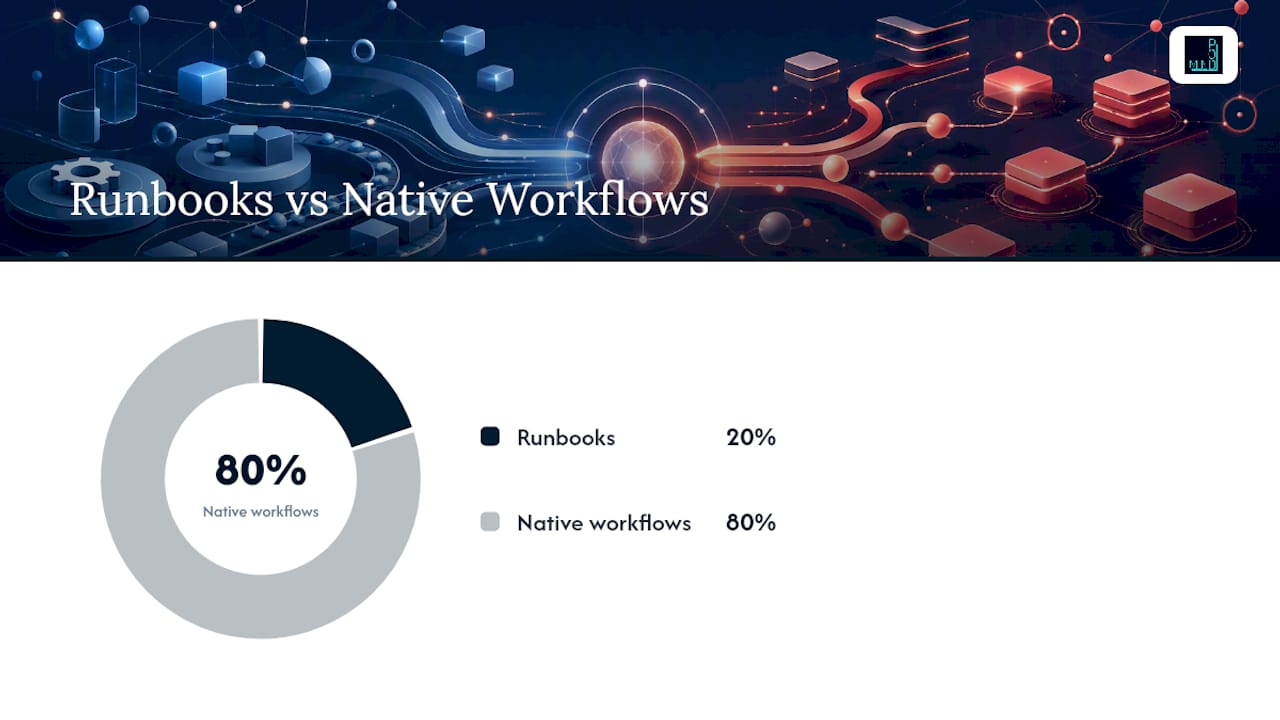
Azure Automation runbooks earn their keep in the other 20%: cross-service orchestration, calls to custom APIs, ServiceNow or other ITSM integrations, and branching logic that a template simply cannot express.
Three signals tell you it's time to write a runbook instead of configuring another template:
- You need to call a system outside Microsoft Graph as part of the flow, like a ticketing platform or an HR database with a proprietary API.
- The logic branches on conditions Lifecycle Workflows doesn't expose, such as combining attributes from two different source systems.
- You need retry logic, custom error handling, or scheduling outside what the built-in triggers support.
The tradeoff is maintenance. A runbook is code: it needs version control, a credential lifecycle you own, and test coverage before every change. A Lifecycle Workflow template is configuration Microsoft maintains for you. That difference alone should push you toward native workflows whenever the use case fits, a point Microsoft's own governance automation documentation makes directly: native workflows reduce maintenance overhead compared with custom runbooks for HR-driven JML scenarios.
Pro Tip: Before writing a single line of PowerShell, try to solve the problem with a Lifecycle Workflow custom task or a Logic Apps extension first. Reach for a runbook only when neither can express the logic you need.
If cost and maintenance tradeoffs matter to your team, the same discipline that applies to Azure cost optimization applies here: every custom script is an ongoing line item, not a one-time build.
Setting Up an Azure Automation Account for Microsoft Graph
Building the automation account correctly the first time saves you a rebuild later. Follow this order:
- Create the Automation account in the Azure portal, choosing a resource group and region close to your other Entra-related resources, and confirm you're on a current PowerShell runtime version rather than a legacy one.
- Import Microsoft.Graph.Authentication first. This module handles the connection itself, and other Graph modules depend on it being present.
- Add Microsoft.Graph.Identity.Governance next, plus any other Graph submodules your specific scripts call, such as Users or Groups.
- Write and test the runbook locally in PowerShell before publishing it into Automation, so you catch syntax and logic errors on your own machine, not in a production job log.
- Publish the runbook, then create a schedule or webhook trigger depending on whether the task runs on a timer or in response to an event.
- Evaluate hybrid workers if the runbook needs to reach on-premises resources like a legacy HR system or an internal API that isn't internet-facing.
Each of these steps maps to Microsoft's own Azure Automation governance documentation, which confirms that Graph modules should be layered in this order to avoid dependency errors.
Which Authentication Method Should Automation Use?
Managed identity is the right default for a single-tenant Automation account. There's no secret to rotate, no certificate to renew, and role assignments are simpler because the identity is tied directly to the Azure resource rather than a standalone app registration.
Certificate-backed app registrations are the right fallback when a managed identity isn't possible, such as cross-tenant scenarios. The pattern: upload the PFX to Key Vault, then store the certificate thumbprint as an Automation variable so the runbook can reference it without hardcoding anything. One practitioner writeup on getting started with Graph and Azure Automation recommends building in detection for certificate rotation in progress, so a runbook doesn't fail silently mid-rotation.
If you're stuck using a client secret, treat it as a liability to be managed, not a convenience:
- Store the secret in Key Vault, never in runbook variables or inline code.
- Set an expiration alert well before the secret actually lapses.
- Rotate it programmatically on a schedule rather than waiting for someone to notice it broke.
Pro Tip: Audit every app registration tied to automation once a quarter. Orphaned registrations with standing Graph permissions are one of the most common findings in an identity security review, and nobody remembers why they exist a year later.
Extending Workflows With Logic Apps and Ticketing Systems
Custom extensions let a Lifecycle Workflow pause, hand control to an external system, and resume once that system reports back. This is how you connect Entra to a ticketing platform without writing a full integration from scratch.
The ServiceNow pattern is the clearest example: Lifecycle Workflows can launch a Logic App that creates a ServiceNow ticket, and the entitlement management process pauses until that ticket closes. The Logic App calls a Graph resume endpoint once the external system confirms the work is done, and the workflow continues from where it left off.
A few design details matter more than they look:
- Map stage instance IDs carefully. Losing track of which callback belongs to which workflow run creates orphaned pauses.
- Build for idempotency. A retried callback should not double-provision access or fire a second ticket.
- Handle timeouts explicitly. Decide what happens if the external system never calls back, rather than letting a workflow hang indefinitely.
Least-Privilege Permissions, Logging, and a Testing Checklist
Scope permissions tightly. Use EntitlementManagement.Read.All for read-only queries and reserve EntitlementManagement.ReadWrite.All for scripts that actually modify assignments, and prefer catalog-level role assignments over tenant-wide application permissions whenever the automation only touches a single catalog.
Every runbook should write structured logs and forward them to Log Analytics, correlated against Entra audit logs so you can trace an unexpected access change back to the job that caused it. Practitioners increasingly treat automation like software: source control, logging, and human approval gates for anything destructive.
Before any script touches production:
- Run it against a small, disposable test scope first.
- Trigger an on-demand run and read the full job history, not just the success flag.
- Require a human approval step for any action that removes access or deletes an account.
A Minimal Runbook Pattern and Fast Troubleshooting
A working runbook usually starts with the same three lines: connect using a certificate thumbprint or managed identity, query the resource, and output JSON for review.
- Connect with
Connect-MgGraph -Identityfor managed identity, or-CertificateThumbprintplus your app ID for certificate auth. - Query with a cmdlet like
Get-MgEntitlementManagementAccessPackageto pull the access packages you're targeting. - Output the result through
ConvertTo-Jsonso the job log gives you something readable to verify.
When a runbook fails, check these first, roughly in order of how often they're the actual cause: a delayed module import that hasn't finished registering, missing admin consent on the app registration, a mismatched certificate thumbprint in the Automation variable, a Key Vault access policy that doesn't include the Automation account's identity, and a mismatch between the module version in Automation and what you tested locally. Reproduce the failure locally with the same PowerShell version, turn on Enable-Verbose output, and confirm the identity actually has the Graph permission before assuming the code is broken.
Rotating Credentials and Retiring memberOf Rules
Credential rotation shouldn't depend on someone's calendar reminder. Automate the alert, and test the rotation itself in a non-production scope before you touch anything live.
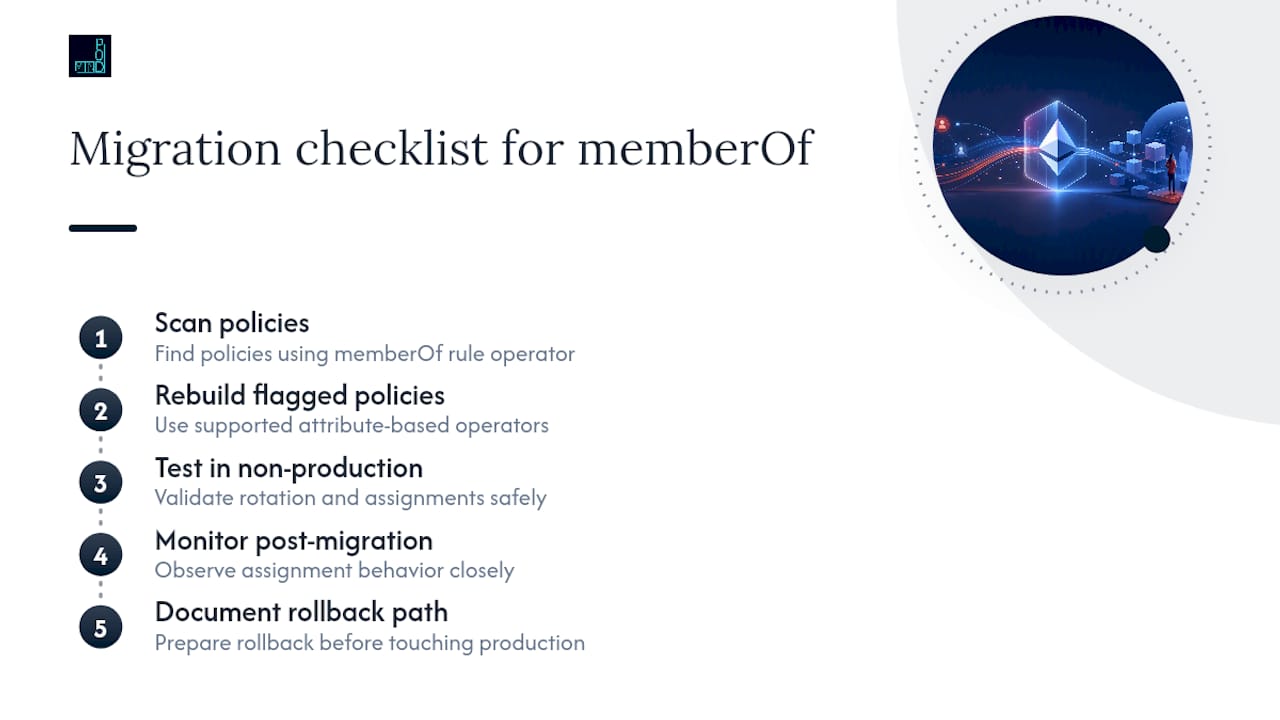
The more urgent item: automatic assignment policies built on the memberOf rule operator will be quarantined starting November 3, 2026 unless rebuilt with supported attribute-based operators first. Run a script now that scans your existing policies for memberOf usage, rebuild the flagged ones, and monitor assignment behavior closely after migration. Document a rollback path before you touch a production policy, not after something breaks.
What I'd Prioritize First If I Were Running This
Chase the high-frequency, low-risk templates first. Onboarding and standard offboarding touch every employee, so fixing those pays back fast and builds trust in the system before you automate anything riskier.
Treat any script that removes access as a software feature, not a script: code review, tested rollback, a human checkpoint before it fires. That's also the point where scoping permissions correctly stops being optional. If you're unsure where the blast radius actually sits, that's worth a conversation with someone who's scoped this kind of automation before, not a guess.
— jaras
How Mindpod Technologies Helps You Build This Right the First Time
You can engage a specialist to get your Entra automation off the ground without hiring a full-time identity engineer. Where some SMBs either overbuild with custom scripts nobody maintains or underbuild with manual JML processes that quietly fail, a free technology assessment can rank your automation opportunities by risk and payback, helping you identify where a Lifecycle Workflow solves the problem and where you genuinely need a runbook.

From there, the relevant offerings map directly to what this guide covers: Fractional CTO engagements for teams that need ongoing architecture and permissions-scoping decisions made by someone who's done it before, Cloud & Training for internal teams that need to actually run and troubleshoot what gets built, and Custom Apps work when your integration needs go past what a Logic App extension can handle. Book the Enterprise Intelligence Assessment to get a prioritized, plain-language plan you own before a single runbook gets written.
Microsoft Documentation Worth Bookmarking
- Lifecycle Workflows templates and categories
- Automate Microsoft Entra ID Governance tasks with Azure Automation
- Configure an automatic assignment policy for entitlement management
- Least privileged scenarios for identity governance
- Related: onboarding process references for engineering managers, a useful outside perspective on structuring the onboarding side of JML.
Sources
- Lifecycle Workflows templates and categories - Microsoft Entra ID Governance | Microsoft Learn
- Automate Microsoft Entra ID Governance tasks with Azure Automation - Microsoft Learn
- Configure an automatic assignment policy for an access package in entitlement management - Microsoft Entra
FAQ
Should I Start With Lifecycle Workflows or Azure Automation?
Start with Lifecycle Workflows for anything that fits a standard joiner-mover-leaver pattern. Reserve Azure Automation runbooks for custom orchestration, third-party integrations, or branching logic that native templates can't express.
Which Microsoft Graph Modules Do I Need for Entra Automation?
Import Microsoft.Graph.Authentication first since other modules depend on it, then add Microsoft.Graph.Identity.Governance for entitlement management tasks. Add further Graph submodules only as your specific scripts require them.
Is a Managed Identity Better Than a Certificate for Automation Auth?
Managed identity is the preferred approach for single-tenant Automation accounts because there's no secret or certificate to rotate. Use a certificate-backed app registration stored in Key Vault as the fallback when a managed identity isn't available.
What Happens to memberOf Rules in Assignment Policies?
Automatic assignment policies using the memberOf rule operator will be quarantined starting November 3, 2026 unless rebuilt with supported attribute-based operators. Scan your policies now rather than waiting for the deadline.