

Run focused, repeatable tests that validate one trusted recovery path for each critical service, not a sprawling plan covering every system you own. That's the whole game. Disaster recovery testing exists to answer one question with evidence instead of hope: if a server dies, a data center floods, or ransomware hits tonight, can you actually get back up inside the time your business can tolerate?
Most SMBs never find out until it's too late, because untested backups and stale runbooks fail quietly until the moment they can't.
Start here, this week:
- Identify your top three critical services (the ones that stop revenue or payroll if they go down) and rank them by business impact.
- Verify offline or immutable backups exist for each one, and confirm someone has actually opened a restored file in the last 90 days, not just checked for a green success icon in a backup dashboard.
- Schedule one restore or failover drill for your highest-impact service within 30 to 60 days. Don't wait for a "full DR test" budget to materialize. One validated recovery beats five theoretical ones.
Pro Tip: NIST SP 800-34-style guidance and CISA's ransomware recovery framework both make the same point in different words: the recovery path you've tested is the only one you can trust. Everything else is a guess dressed up as a plan. If budget or staff time is the constraint, Mindpodtech's disaster recovery advisory work is built around exactly this problem: proving one path works before promising ten.
Key Takeaways
Disaster recovery testing works when it validates a small number of recovery paths repeatedly rather than documenting many paths nobody ever rehearses.
| Point | Details |
|---|---|
| Validate one path per critical service | Focus testing effort on your highest-impact systems before expanding scope. |
| Confirm backups are offline and immutable | Ransomware actively targets connected backups, so isolation is not optional. |
| Test restores end-to-end | A successful backup job code does not confirm the data actually restores and runs. |
| Tie test schedules to change | Retest after any significant infrastructure, vendor, or application change. |
| Track metrics and remediate | Measure actual RTO, RPO, and pass/fail rate, then close gaps before the next test. |
| Get expert help when resources are tight | Mindpodtech's disaster recovery advisory builds and hardens test programs for SMBs with limited in-house DR staff. |
Pro Tip: Reduce the number of recovery paths you maintain, then test the ones you keep frequently. A recovery path tested quarterly is more trustworthy than ten paths tested once.
Table of Contents
- What Is Disaster Recovery Testing, and What Should It Prove?
- Which Type of DR Test Fits Your Risk Level?
- How Do You Plan a Disaster Recovery Test?
- How Do You Run a Disaster Recovery Test Step by Step?
- How Do You Recover from Ransomware Without Reinfecting Your Systems?
- What Metrics Prove Your Recovery Plan Actually Works?
- What Should a Sample DR Test Plan Look Like?
- What Do SMB Leaders Get Wrong About DR Testing?
- How Mindpodtech Supports Disaster Recovery Testing
- Where to Learn More About Disaster Recovery Testing
- Sources
- FAQ
What Is Disaster Recovery Testing, and What Should It Prove?
Disaster recovery testing is a structured exercise that verifies your organization can actually restore systems and resume critical business functions within agreed recovery time and recovery point objectives, rather than assuming a backup job that finished successfully means you're covered. The distinction matters more than it sounds. A backup that completes without error tells you data was copied somewhere. It tells you nothing about whether that data can be turned back into a working application your finance team can log into on a Tuesday morning.
A properly designed test has to prove five separate things, and skipping any one of them leaves a blind spot:
- Backup integrity and restorability. Data exists, is uncorrupted, and can be extracted into a usable state.
- Runbook accuracy and team roles. The people executing the recovery know their assignments, and the written steps match the current environment.
- RTO and RPO in practice, not on paper. If your target is a four-hour recovery time objective, a real test tells you whether that's true or aspirational.
- Third-party vendor recovery commitments. Your cloud host, backup vendor, or MSP has service-level agreements. A test confirms they hold up under pressure.
- Configuration drift. Production environments change constantly. DR environments often don't keep pace, and that gap is where failovers quietly break.
This isn't an internal opinion. NIST SP 800-34 treats contingency plan testing as a required, risk-scaled activity, and CISA's ransomware guidance is built around the same premise: an untested recovery capability is not a recovery capability. GitLab's well-documented 2017 database incident is the case study everyone in infrastructure eventually hears about: multiple backup layers turned out to be silently broken, and only a live restore attempt exposed it, at the worst possible time.
Which Type of DR Test Fits Your Risk Level?
Not every system deserves a full failover rehearsal, and pretending otherwise is how DR programs burn out their IT staff and never get repeated. The smarter approach, and the one NIST's impact-based testing model recommends, is matching test rigor to what the system actually costs the business if it goes down.
Five test types cover most SMB needs, each proving a different layer of confidence:
- Tabletop exercise. A discussion-based walkthrough where the team talks through a scenario, decisions, and escalation paths without touching any systems.
- Walkthrough. Similar to a tabletop but includes reviewing the actual runbook documents line by line, checking them against current infrastructure.
- Simulation or functional test. A live test of a specific function, like restoring a single database from backup, in an isolated environment.
- Parallel or partial failover. Standing up a secondary environment alongside production to confirm it can run real traffic without cutting over fully.
- Full interruption or failover. Actually switching production traffic to the DR environment, with all the disruption and risk that implies.
| Test Type | What It Validates | Disruption Level | Confidence Gained | Time/Resource Cost | Best Use Case |
|---|---|---|---|---|---|
| Tabletop | People, decisions | None | Low | Low (hours) | Compliance, onboarding new staff, non-critical systems |
| Walkthrough | Procedures, documentation | None | Low to moderate | Low | Reviewing runbooks after any environment change |
| Simulation/functional | Technical restore | Minimal (isolated env) | Moderate to high | Moderate | Database restores, single-app recovery validation |
| Parallel/partial failover | People + procedures + technical | Low to moderate | High | Moderate to high | Mid-tier business services with real dependencies |
| Full interruption | Everything, end-to-end | High | Highest | High | Top-tier revenue systems, annual compliance mandates |
For most SMBs, the practical sequence is tabletop for anything noncritical, functional restore tests for anything storing customer or financial data, and one full failover rehearsal a year reserved for whatever system would actually put you out of business if it stayed down for a day.
How Do You Plan a Disaster Recovery Test?
A test plan lives or dies on scope. Trying to validate every system at once is how DR testing programs collapse under their own ambition and quietly stop happening. Pick systems based on business impact, not on what's easiest to test.
Start by mapping your critical asset list to service tiers: Tier 1 (revenue-stopping if down), Tier 2 (significant operational pain), Tier 3 (inconvenient but tolerable). Then work through the following before scheduling anything:
- Define success criteria in numbers, not adjectives. "Restore the order database within 4 hours with less than 15 minutes of data loss" is testable. "Recover quickly" is not.
- Set acceptance criteria for dependent services. DNS, authentication, and payment gateways often get forgotten until the test reveals the app "restored successfully" but nobody can log into it.
- Assign roles before the test, not during it. Who declares the test incident, who executes each restore command, who checks in with any vendor whose SLA you're relying on.
- Confirm vendor SLA windows in advance. A cloud backup vendor's stated recovery window is worth confirming against your actual test data, not just their marketing page.
- Budget realistically. A tabletop for one Tier 2 system might cost a few staff hours. A full failover rehearsal for a Tier 1 revenue system, including a scheduled maintenance window and vendor coordination, can run from a few thousand dollars in staff time to five figures if it requires standby infrastructure and after-hours work.
A workable planning checklist:
- Scope document naming systems, owners, and tier
- Success criteria with specific RTO/RPO numbers
- Communications plan (who's notified, who's silent)
- Vendor SLA confirmation in writing
- Rollback plan if the test itself causes disruption
- Sign-off from a business owner, not just IT
How Do You Run a Disaster Recovery Test Step by Step?
The gap between a test that produces real evidence and one that produces a false sense of security usually comes down to discipline in execution, not cleverness in design.
Before the test:
- Get written sign-off from the business owner of the system being tested.
- Schedule a maintenance window and freeze unrelated changes to that environment.
- Coordinate with any third-party vendor whose systems are in scope, confirming their support windows match your test window.
- Take a fresh snapshot or backup immediately before starting, so you have a clean rollback point if the test itself goes sideways.
- Distribute the runbook to everyone involved and confirm they've read it, not just received it.
During the test:
- Execute restore or failover tasks in the documented sequence, with one person owning each command or approval step.
- Validate service health at each stage, not just at the end. A database that restores but an application tier that can't connect to it is a partial failure worth catching early.
- Time-stamp every step. Start time, each milestone, completion time. This is the raw data your RTO measurement comes from.
Recording and evidence:
- Capture logs, screenshots, and verification query outputs at each checkpoint.
- Note who signed off that each stage passed.
- Record actual elapsed time against the target RTO, not an estimate.
After the test:
- Roll back to production if the test ran in a live-adjacent environment.
- Draft an after-action report while details are fresh, ideally within 48 hours.
- Update runbooks and infrastructure-as-code templates to reflect anything that didn't match reality.
How Do You Recover from Ransomware Without Reinfecting Your Systems?
Ransomware recovery is where generic disaster recovery guidance falls short, because the threat isn't a natural disaster or a hardware failure. It's an adversary who specifically hunts for your backups and tries to corrupt or encrypt them first. CISA's #StopRansomware Guide is blunt about this: backups must be offline, encrypted, and immutable, isolated from the production network attackers already compromised.
Attackers routinely search for and destroy accessible backups before deploying ransomware, specifically to eliminate a victim's ability to recover without paying. A backup connected to the same network as production is a backup an attacker can reach.
That single fact reshapes how a ransomware recovery plan has to work. Microsoft's ransomware protection guidance recommends treating a ransomware incident less like a restore and more like a rebuild: bring systems back from hardened golden images rather than trusting an in-place recovery of a system that might still carry the malware's foothold.
A practical ransomware recovery checklist looks like this:
- Maintain golden images for critical systems, version-controlled and stored offline, refreshed on a set schedule.
- Keep infrastructure-as-code templates for your environment stored offline, so you can rebuild infrastructure without depending on documentation that might itself be encrypted.
- Store restoration credentials air-gapped, separate from your everyday identity system, since attackers who compromise Active Directory often compromise the credentials used to manage backups too.
- Isolate any affected systems immediately and confirm backup integrity before starting restoration, per CISA's incident response walkthrough.
- Rebuild authentication and DNS first. Restoring application servers before your identity layer is trustworthy again just reconnects a clean system to a compromised one.
- Reset credentials and service accounts before any restored system touches the network.
- Validate each system individually before reconnection, rather than restoring everything simultaneously and hoping.
Pro Tip: Test restores end-to-end, not backup job success codes. A backup job reporting "success" tells you a copy operation finished. It says nothing about whether that data will actually open, run, or authenticate correctly, and Safeguard's review of common restore failures found that hidden problems like permission errors and version mismatches routinely hide behind a clean success log until someone actually tries to use the restored system.
Teams handling their own accounting or QuickBooks Online data specifically face this exact gap. Akika Labs' work on QuickBooks backup and restore is worth a look if financial system continuity is one of your Tier 1 concerns, since SaaS accounting platforms often get excluded from DR plans on the mistaken assumption the vendor handles it.
What Metrics Prove Your Recovery Plan Actually Works?
A DR test that doesn't produce numbers is a story, not evidence. Leadership, auditors, and cyber insurance underwriters all want the same thing: a scorecard showing target versus actual performance.
Four metrics matter most:
- RTO (Recovery Time Objective). The maximum tolerable time a system can be down. A test measures actual recovery time against this target.
- RPO (Recovery Point Objective). The maximum tolerable data loss, measured in time. If your RPO is 15 minutes and your last valid backup was 40 minutes old, that's a failed test even if the restore itself worked perfectly.
- MTTR (Mean Time to Recovery). The average time across multiple incidents or test runs, useful for tracking improvement over successive tests.
- Pass/fail rate. The percentage of defined success criteria actually met during the exercise.
Reporting cadence should match the audience. Leadership wants a one-page executive summary: did the test pass, what's the business risk if it didn't, what's the remediation timeline. Operations teams need the full technical appendix with time-stamped logs. Auditors and cyber insurance reviewers need a clean evidence package: signed test plans, logs, and the after-action report, kept on file for whatever retention period your compliance obligations require.
What Should a Sample DR Test Plan Look Like?
Three scenario templates cover the range most SMBs actually need, from cheapest to most resource-intensive.
| Scenario | Objective | Expected Duration | Disruption Level | Key Success Checks |
|---|---|---|---|---|
| Tabletop ransomware triage | Walk through decision points, roles, and escalation for a ransomware event | 90 minutes | None | All roles assigned; escalation path clear; no live systems touched |
| Restore-from-backup (functional) | Restore a database and application tier from backup in an isolated environment | 3 hours | Minimal | Data integrity confirmed; app connects and authenticates; RPO measured |
| Full failover rehearsal | Promote a standby replica or switch DNS to a standby environment | 6 hours | High | Production traffic served from standby; RTO measured; rollback confirmed clean |
A workable tabletop runbook snippet reads something like: "Facilitator presents scenario: ransomware detected on file server at 9:00 AM. Team has 15 minutes to identify first three actions. IT lead confirms backup isolation status. Communications lead drafts internal notification. Debrief: what decision took longest, and why?"
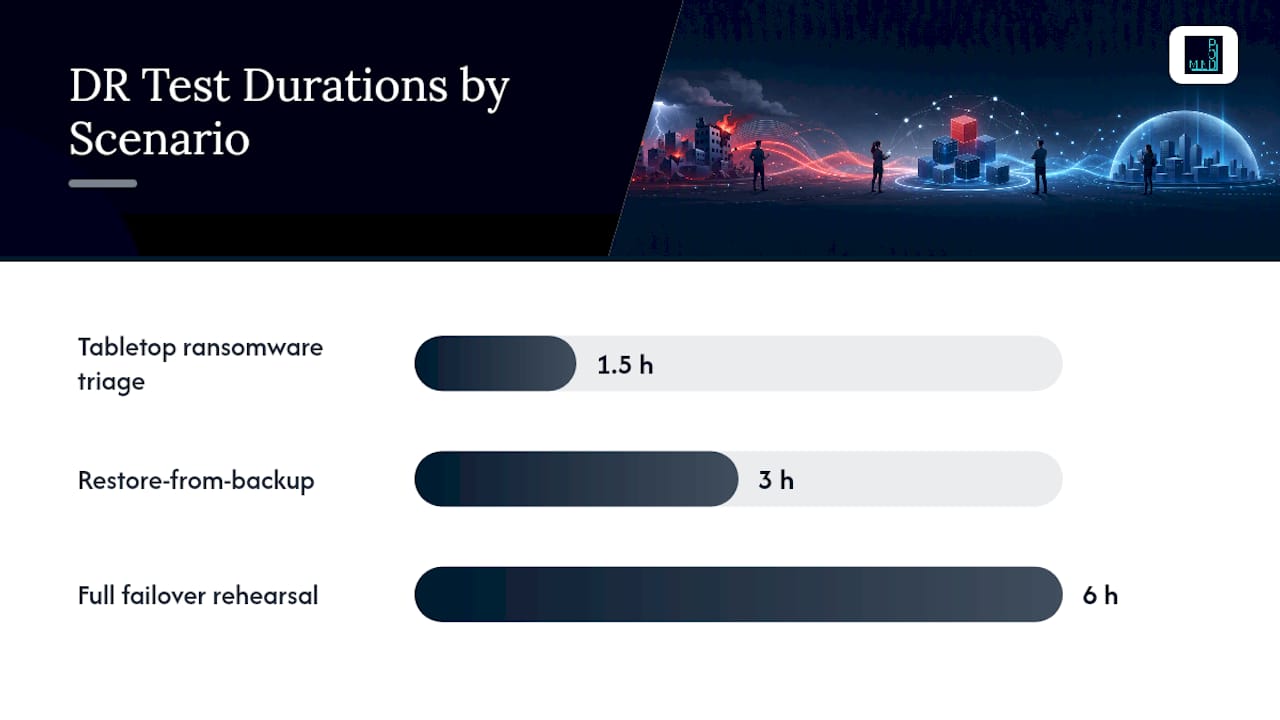
For the restore-from-backup scenario, staff time typically runs two people for half a day: one executing the restore, one validating and logging results. Full failover rehearsals usually need three to five people across IT, a vendor contact on standby, and a business owner available to make the go/no-go call.
Testing this integration and dependency layer is where lessons from broader software QA practice apply directly. Oak & Nine's overview of system integration testing covers the same underlying discipline DR testing depends on: confirming that components which work in isolation still work when they depend on each other.

What Do SMB Leaders Get Wrong About DR Testing?
The conventional advice on disaster recovery testing tends to push toward comprehensiveness: test everything, document everything, cover every failure mode. For an SMB with a two-person IT team and no dedicated DR budget, that advice is a trap. It produces a beautiful plan that never gets executed because it's too expensive to run more than once.
The better instinct, and the one AWS's own testing guidance leans on, is to shrink the number of recovery paths you maintain and test the few you keep, relentlessly. A complex DR plan with fifteen documented recovery scenarios that get tested once a year each is weaker than three scenarios tested quarterly. Familiarity with a recovery path, built through repetition, is what actually shortens recovery time during a real incident. Complexity you haven't rehearsed is just risk with better documentation.
The three failure patterns I see most often in SMB environments: runbooks that reference a system architecture from eighteen months ago, backup jobs that "succeeded" for months without anyone opening the restored file, and a critical dependency on a third-party vendor nobody confirmed still has the SLA the contract claims. All three are avoidable, and none of them require a big budget to fix. They require someone actually running the test.
If you can only run one test this quarter, here's the order I'd recommend: first, confirm your single most critical backup restores cleanly in an isolated environment. Second, time that restore against your stated RTO and write down the real number. Third, fix the one thing that broke, then schedule the next test before you close the after-action report, not after.
How Mindpodtech Supports Disaster Recovery Testing
Building a DR testing program from scratch, on top of a full-time job running IT operations, is exactly the kind of work that gets pushed to "next quarter" indefinitely. Mindpodtech's backup and disaster recovery advisory work exists to close that gap without requiring you to hire a dedicated DR team.

The engagement covers what actually moves the needle for a resource-constrained IT department: fractional CTO guidance on prioritizing which systems get tested first, infrastructure-as-code templating so your DR environment stops drifting from production, backup hardening aligned with CISA and NIST recommendations, and runbook development that turns tribal knowledge into a document your whole team can execute under pressure. The goal isn't a binder full of theoretical procedures. It's a reduced, validated RTO on your most critical service, an RPO you've confirmed rather than assumed, and an evidence package you can hand an auditor or a cyber insurance underwriter without scrambling.
Mindpodtech starts every engagement with a free technology assessment that produces a prioritized, plain-language plan you own outright, whether or not you move forward with additional support. If DR testing has been sitting on your to-do list for longer than you'd like to admit, request that assessment through Mindpod Technologies and get a concrete starting point instead of another open item.
Where to Learn More About Disaster Recovery Testing
- CISA's #StopRansomware Guide covers offline backup requirements, golden image maintenance, and the ransomware recovery checklist referenced throughout this guide.
- CISA's ransomware incident response walkthrough details triage, isolation, and prioritization steps for active incidents.
- AWS's disaster recovery testing whitepaper explains risk-based test frequency and the configuration drift problem in technical depth.
- Microsoft's ransomware protection guidance details golden image and rebuild strategies for post-incident recovery.
- TechTarget's ransomware recovery guide walks through practical recovery sequencing and cost considerations.
- Safeguard's DR testing practical guide, including the GitLab case study referenced above, is worth reading for a real-world account of what untested backups actually cost.
- Mindpod Technologies is the conversion touchpoint for readers who want a free technology assessment and a prioritized DR testing plan built around their specific environment.
Sources
- Testing disaster recovery
- Protect against ransomware: phase 1 | Microsoft
- Disaster Recovery Testing: A Practical Guide
FAQ
What is disaster recovery testing?
Disaster recovery testing is an exercise that verifies you can restore systems and resume critical operations within your target recovery time and recovery point objectives, rather than assuming a completed backup job means recovery will work.
How often should you run a disaster recovery test?
Frequency should match system impact: annual full failover rehearsals for top-tier revenue systems, quarterly functional restore tests for moderate-impact systems, and tabletop exercises as often as staffing allows for lower-impact systems.
What's the difference between a tabletop exercise and a full failover test?
A tabletop exercise is a discussion-based walkthrough of roles and decisions with no systems touched, while a full failover test actually switches production traffic to a standby environment and measures real recovery time.
How do you recover from ransomware without reinfecting restored systems?
Rebuild authentication and DNS first, reset all credentials and service accounts before reconnecting any restored system, and validate each system individually using offline golden images before it touches the network again.
Can a small business afford regular disaster recovery testing?
Yes, if the scope stays narrow. Testing one or two critical recovery paths quarterly costs far less in staff time than a full multi-system DR program, and Mindpodtech's advisory work is built specifically around prioritizing that narrow, repeatable scope for resource-constrained teams.
What metrics prove a disaster recovery plan actually works?
Actual recovery time against your RTO target, actual data loss against your RPO target, and the percentage of defined success criteria met during the test, tracked in a scorecard over successive tests.