

A disaster recovery plan is a documented process for restoring critical IT systems, applications, and data after an outage, built around two measurable targets: recovery time objective (RTO) and recovery point objective (RPO). If you don't have one yet, the first move isn't buying backup software. It's running a business impact analysis (BIA) to figure out which systems actually need fast recovery and which can wait.
TL;DR:
- A thorough BIA is essential to identify which systems need rapid recovery and to prioritize spending accordingly, rather than purchasing backup tools first.
- Recovery strategies should align with the criticality of systems, ranging from simple backup-and-restore to active-active deployment, balancing cost and recovery speed.
- Testing should be tailored to system importance and include full drills, with documented outcomes and regular updates to ensure plan accuracy and effectiveness.
- Proper escalation criteria and a detailed runbook are vital to prevent delays and confusion during disaster declaration and recovery execution.
- Integrating cybersecurity with disaster recovery plans, including immutable or air-gapped backups, is crucial to prevent restoring malware or backdoors during recovery.
Table of Contents
- What Is a Disaster Recovery Plan, and How Is It Different From Business Continuity?
- Building the Core of Your Plan: BIA, Inventory, RTO, and RPO
- Choosing a Recovery Strategy: Backup, Pilot Light, Warm Standby, or Active-Active
- How Do You Write the Failover and Failback Runbook?
- How Often Should You Test a Disaster Recovery Plan?
- Keeping the Plan Current: Governance and Budget
- The Mindpod Advisory Take on Disaster Recovery
- Templates and Resources Worth Keeping On Hand
- Where Cybersecurity Fits Inside Disaster Recovery Planning
- The Part of Disaster Recovery Planning Everyone Underrates
- Get a Disaster Recovery Plan Built Around Your Real Risk, Not a Generic Template
- Sources
- FAQ
What Is a Disaster Recovery Plan, and How Is It Different From Business Continuity?
A disaster recovery plan (DRP) covers the technical side of getting IT systems, data, and infrastructure back online after a disruption, whether that's ransomware, a server failure, or a flooded data center. Ready frames it as a documented, structured approach that should include an inventory of assets, recovery priorities, and data backup strategies built alongside the broader continuity effort.
That's where confusion usually starts, because three plans get used interchangeably when they shouldn't be:
- Disaster recovery plan restores IT infrastructure, applications, and data to a working state.
- Business continuity plan keeps the whole organization functioning during a disruption, including facilities, staffing, supply chains, and customer communication, not just IT.
- Incident response plan handles the immediate detection and containment of a security event, like isolating a compromised server before recovery even starts.
A ransomware attack triggers all three in sequence: incident response contains the breach, the DRP restores clean systems from backup, and the BCP keeps invoicing, payroll, and customer support running while IT works the problem.
Who declares a disaster matters more than most SMBs realize. Waiting too long to declare extends downtime; declaring too fast triggers an expensive failover for a problem that would have resolved on its own. Most plans assign this call to a named DR lead or IT director, with escalation criteria tied to specific thresholds: system unavailability past a defined window, confirmed data loss, or a security event affecting production data. The Microsoft Azure Well-Architected disaster recovery guidance recommends pairing automated alerts with a required human review step before any formal declaration, specifically to prevent premature failovers.
Building the Core of Your Plan: BIA, Inventory, RTO, and RPO
Every credible disaster recovery plan starts with a business impact analysis, and most SMBs skip or rush this step because it feels like paperwork rather than IT work. It isn't. The BIA is what tells you where to actually spend money.
Here's a workable sequence:
- List every business process that depends on IT, from order processing to payroll to customer support ticketing.
- Estimate the cost of downtime for each process in dollar terms per hour or per day, including lost revenue, labor cost, contractual penalties, and reputational impact.
- Rank processes into criticality tiers (typically three or four), separating the systems that halt revenue immediately from the ones that can wait a week.
- Build an asset inventory for each tier: servers, applications, databases, third-party vendors, and the access credentials needed to reach them during an outage.
- Translate impact into targets by setting an RTO (how fast the system must come back) and an RPO (how much data loss, measured in time, is tolerable) for each tier.
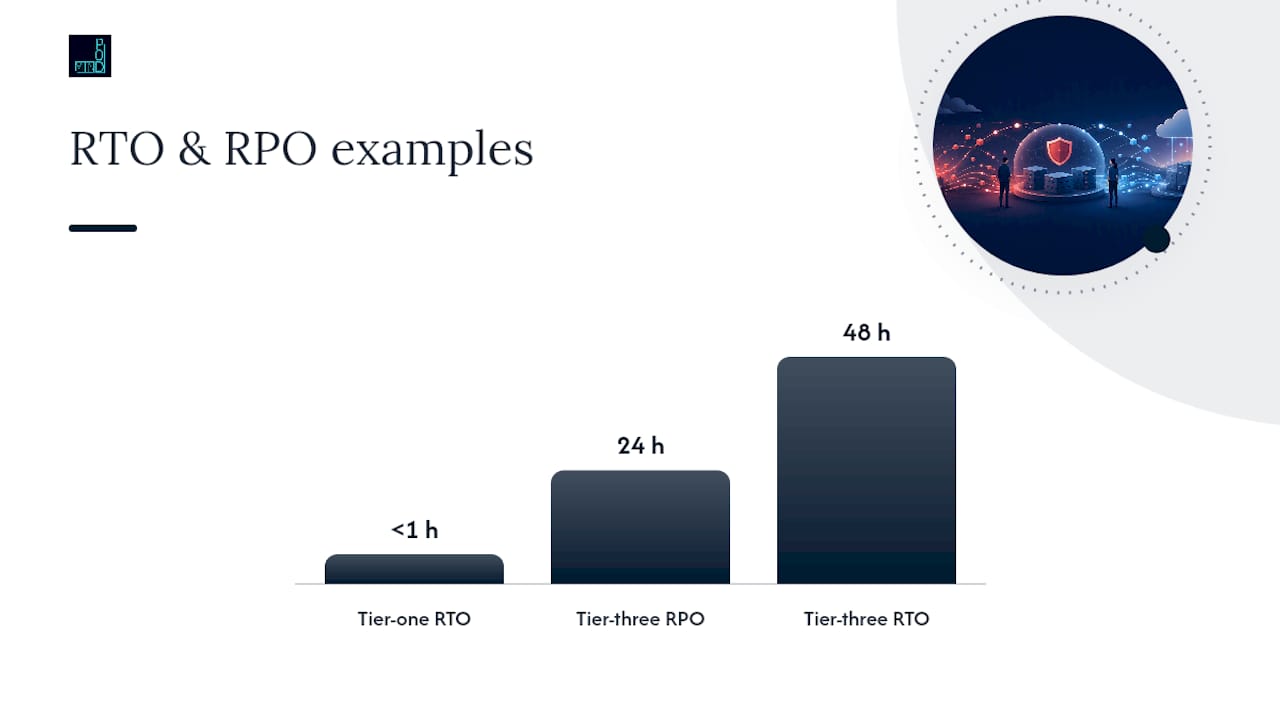
RTO and RPO aren't the same number, and the gap between them changes the technical strategy. A tier-one payment system might need an RTO under one hour and an RPO near zero. A tier-three internal wiki might tolerate an RTO of 48 hours and an RPO of 24 hours. RPO can range from near zero with synchronous replication to several hours with batch backups, and RTO can range from near instant with active-active architecture to over a day with a basic backup-and-restore setup. Mapping those ranges against your BIA numbers is what a recovery target framework is built to do.
Assign ownership before you need it. A working DR team typically includes a DR lead who owns the plan and calls the disaster, technical owners responsible for their specific systems, a communications owner who manages internal and external messaging, and an executive sponsor who approves spend and removes organizational roadblocks during recovery.
Pro Tip: Run the BIA interview with department heads, not just IT staff. Operations and finance people know the real dollar cost of downtime; IT usually only knows the technical dependencies.
Choosing a Recovery Strategy: Backup, Pilot Light, Warm Standby, or Active-Active
Once you know your RTO and RPO targets by tier, the technical strategy mostly picks itself. AWS's Well-Architected guidance on recovery strategies lays out four common patterns, ordered by increasing cost and decreasing recovery time:
- Backup and restore stores data offsite or in the cloud and rebuilds infrastructure from scratch when disaster strikes. Lowest cost, but RTO can stretch past 24 hours.
- Pilot light keeps a minimal version of core infrastructure running in a secondary environment, scaled up only when needed. Cuts RTO to hours instead of a full day.
- Warm standby runs a scaled-down but fully functional copy of production continuously, ready to take full load with some scaling. RTO drops to minutes.
- Active-active runs full production capacity in two or more regions simultaneously, with traffic routed live to both. Near-zero RTO and RPO, at the highest ongoing cost.
There's no universal right answer here. The Azure Well-Architected framework makes the point directly: picking recovery investment based on actual business impact, rather than applying the same strategy everywhere, is what keeps DR spend proportional. Running active-active replication for an internal file share is money wasted. Running backup-and-restore for a customer-facing payment gateway is a liability waiting to surface.
Cost and complexity climb together as you move up that list. Backup-and-restore needs almost no ongoing orchestration, just tested restore scripts and a place to store backups. Active-active needs continuous data replication, conflict resolution logic, health checks, and traffic routing that can shift load instantly, along with staff who know how to run all of it.
Cloud-hosted workloads make pilot light and warm standby far more affordable than they used to be, since you're not paying for idle hardware sitting in a second data center. On-premises environments still work, but replicating a physical data center is expensive and slow to scale, which is why many SMBs run a hybrid model: core production on-prem or in one cloud region, with a lighter-weight recovery environment in the cloud. Whichever pattern you choose, pay attention to data consistency during replication and failover sequencing. Systems that depend on each other (a database and the application that reads it, for instance) need to fail over in the right order, or you'll recover a broken state instead of a working one.
How Do You Write the Failover and Failback Runbook?
A runbook is the step-by-step script your team follows when a disaster gets declared, and it needs to cover both directions: getting to the recovery environment (failover) and getting back to primary once it's safe (failback). Microsoft's guidance on multi-region disaster recovery recommends structuring runbooks around a clear sequence rather than a loose checklist.
A solid runbook structure looks like this:
- Trigger — the monitoring alert or reported failure that starts the process.
- Assessment — a human reviews the alert to confirm it's real and scoped correctly, not a false positive.
- Declare — the DR lead formally declares a disaster based on preset criteria.
- Execute — technical owners run the documented failover steps for their systems.
- Validate — the team confirms recovered systems are functioning and data integrity holds.
- Close — the incident is documented and the team either stays on standby in the recovery environment or begins planning failback.
Failback deserves its own separate procedure, and it's routinely the part SMBs forget to plan for. Reconciling data written during the outage with the primary environment, without corrupting either side, takes deliberate sequencing and testing, not improvisation under pressure.
Communication runs parallel to execution. Build a stakeholder list before you need it: who gets notified internally, who handles customer-facing messages, and which channels are used when your primary email or chat system might be part of the outage. Set a message cadence (hourly updates during active recovery, for instance) so stakeholders aren't left guessing.
Pro Tip: Keep your escalation criteria written down as specific thresholds, not judgment calls. "System down for more than 30 minutes" prevents arguments in the moment that a vague "when it seems serious" invites.
How Often Should You Test a Disaster Recovery Plan?
Test cadence should scale with how critical the system is, not run on one fixed schedule for everything. Common practice includes regular tabletop exercises, component-level tests, and full-scale drills for the most critical systems. Ready.gov's guidance notes that production drills are often the only way to validate a true RTO, since tabletop walkthroughs test decision-making but not actual recovery speed.
Each test type checks something different:
- Tabletop exercises walk the team through a scenario verbally, testing decision-making and communication without touching real systems.
- Component tests validate a single piece, like restoring one database from backup, in isolation.
- Full-scale drills execute the entire runbook against production or a production-like environment, measuring real recovery time.
During any test, track the numbers that matter: actual time to restore each system against its documented RTO, how much data was lost against the RPO target, and whether data integrity checks pass after restoration. A testing framework that captures step-completion times, not just pass/fail results, tells you exactly where the plan breaks down.
After every test, run a short after-action review. Document what failed, assign an owner and deadline to fix it, and confirm the fix before the next test cycle rather than letting it sit on a list. If your DR strategy depends on third-party vendors (a cloud provider, a managed backup service, a colocation facility), coordinate test windows with them directly. A test that assumes vendor systems will just be available during a drill isn't really testing anything.
Keeping the Plan Current: Governance and Budget
A disaster recovery plan that never gets updated is a plan for the business you had a year ago. Interagency continuity guidance built for financial institutions recommends independent review and periodic updates tied to organizational change, a standard that scales down well for any SMB.
A workable governance rhythm:
- Assign clear ownership of the plan itself, usually the DR lead or IT director, with sign-off from an executive sponsor.
- Review the full plan every 6 to 12 months, even if nothing obvious has changed.
- Trigger an update immediately after any architecture change, a failed test, a vendor switch, or a new regulatory requirement affecting data handling.
- Keep version history and test records for audits, insurance reviews, or compliance requirements in regulated industries.
Budgeting gets easier once your BIA has dollar figures attached. Present the cost-of-downtime numbers for each tier next to the cost of the recovery strategy that protects it. A warm standby environment costing a few thousand dollars a month is an easy approval next to a tier-one system that costs six figures an hour when it's down. Without that framing, DR spend looks like pure overhead, and it gets cut first in a tight budget year.
The Mindpod Advisory Take on Disaster Recovery
Most DR plans Mindpodtech reviews fail for the same reason: they were built once, filed away, and never tested against a real failure scenario. A plan with a polished RTO on paper and zero drill history is a guess, not a plan.
The pitfalls we see most often: no criticality tiering (everything treated as equally urgent, which blows the budget), failback left undocumented, and escalation criteria vague enough that nobody wants to be the one who declares a disaster. Each has a direct fix: tier every system by cost of downtime, write failback as its own tested procedure, and put hard thresholds on the declaration call.
Mindpodtech's disaster recovery and IT advisory services start with a free technology assessment, mapping your systems against realistic RTO/RPO targets before recommending a strategy. You get a prioritized, plain-language plan you own, whether Mindpodtech delivers it or your internal team runs it. Start with a BIA template, a runbook checklist, and a test matrix scaled to your criticality tiers, and build from there.
Templates and Resources Worth Keeping On Hand
A working DR program runs on a small set of documents: a BIA template capturing process, owner, and cost-of-downtime per system; a runbook covering trigger-to-close steps for each critical system; a test plan with scheduled cadence by tier; and a recovery checklist your on-call team can follow without hunting for the full plan.
Store these artifacts somewhere accessible during an actual outage, not just on the server that might be down. That means a highly available location with access controls, plus an offline or printed backup copy, a point Microsoft's guidance on DR asset storage makes directly.
For regulated industries handling financial data, a compliance-first approach to backups is worth reviewing alongside your standard DR documentation. For the underlying frameworks, NIST SP 800-34 and Ready.gov remain the standard reference points for federal-grade DR guidance.
Where Cybersecurity Fits Inside Disaster Recovery Planning
Disaster recovery and cybersecurity used to live in separate binders. They can't anymore, because ransomware and targeted breaches are now among the most common disaster triggers a DRP has to handle, not just fires, floods, and hardware failure.
That changes what "restore" means. Restoring from a backup that itself contains malware or a backdoor just resets the clock on the same attack. Effective integration means backups need to be immutable or air-gapped from production, so an attacker with access to your network can't also encrypt or delete your recovery point. It means your incident response plan and DR plan need a defined handoff: containment and forensics happen first, confirmed clean recovery points get identified second, and only then does restoration begin.
Access control during recovery matters just as much as during normal operations. Recovery environments and credentials used during failover are frequently overlooked in security hardening, which makes them an attractive target if an attacker knows a disaster response is underway. Building security review into your DR runbook, not treating it as a separate audit that happens later, closes that gap. If your organization is running a security assessment separately from your DR planning, the two efforts should reference each other directly rather than operating on parallel tracks.
The Part of Disaster Recovery Planning Everyone Underrates
The conventional wisdom on disaster recovery treats it as a technical checklist: pick a strategy, buy the tooling, write the runbook, done. That framing misses where plans actually fail, which is almost always the business alignment step, not the technology. A warm standby environment configured perfectly is worthless if it's protecting the wrong system because nobody ran a real BIA first.
The bigger issue is that most SMBs size every system the same way, either overprotecting low-value systems out of caution or underprotecting revenue-critical ones because nobody quantified the cost of downtime in dollars. Tiering by business impact, not technical convenience, is the single decision that determines whether your DR budget gets spent well or wasted.
If you're starting from zero, prioritize the BIA before anything else. Skip the temptation to buy a recovery tool first and build the justification for it later. The tool should follow the target, not the other way around.
— jaras
Get a Disaster Recovery Plan Built Around Your Real Risk, Not a Generic Template
Generic DR templates and one-size-fits-all backup software get you partway there, but they don't tell you which systems actually deserve a warm standby versus a basic backup-and-restore setup. A different approach starts with a free technology assessment mapping your critical systems against real cost-of-downtime numbers, then builds recovery targets and a strategy sized to what your business can actually afford and needs.

This work sits inside Mindpodtech's broader IT advisory and cloud services, covering everything from backup architecture to failover testing to the governance model that keeps your plan current instead of shelved. For organizations already running Microsoft or Azure environments, Mindpodtech's autonomous IT operations platform can also handle the monitoring and alerting layer that feeds your disaster declaration process. If you want a straight answer on what your recovery strategy should look like and what it will cost, start with the free technology assessment and get a prioritized plan you own from day one.
Sources
- Ready
- Develop a disaster recovery plan for multi-region deployments - Microsoft Learn
- Architecture strategies for disaster recovery - AWS Well-Architected
- Interagency guidance on business continuity planning (FDIC excerpt)
FAQ
What Is a Disaster Recovery Plan?
A disaster recovery plan is a documented process for restoring IT systems, applications, and data after a disruption, built around measurable recovery time and recovery point targets rather than vague promises to "get things back up."
What Are the Five Steps of Disaster Recovery Planning?
A practical five-step sequence covers a business impact analysis, an asset inventory, setting RTO and RPO targets by system criticality, choosing a recovery strategy (backup and restore, pilot light, warm standby, or active-active), and building a tested runbook with regular drills.
What Are the Four C's of Disaster Recovery?
There's no single standardized "four C's" framework in the authoritative DR guidance from NIST, Ready.gov, or the major cloud providers; treat any source claiming otherwise with caution and rely instead on the documented components of communication, criticality tiering, continuity of operations, and continuous testing.
How Do You Write a Disaster Recovery Plan?
Start with a business impact analysis to identify critical systems and their cost of downtime, set RTO and RPO targets per system, choose a recovery strategy matched to each criticality tier, and document the whole thing as a runbook with defined roles, communication steps, and a testing schedule.
How Is a Disaster Recovery Plan Different From a Business Continuity Plan?
A disaster recovery plan focuses specifically on restoring IT infrastructure and data, while a business continuity plan covers the entire organization, including staffing, facilities, and operations, during and after a disruption.