

Azure Automation runbooks are scripted workflows, written in PowerShell, Python, or a graphical designer, that run in a serverless Azure sandbox or on a Hybrid Runbook Worker to handle routine cloud and hybrid tasks. Teams use them to automate VM start/stop cycles, patch fleets, provision resources, and remediate incidents without a human clicking through the portal every time. The right setup depends on three choices made up front: runbook type, runtime version, and where the job actually executes.
TL;DR:
- PowerShell runbooks are recommended for most tasks, supporting PowerShell 7.x and Az modules, while legacy PowerShell Workflow runbooks require rewriting for migration.
- Testing a runbook involves creating or importing, editing, thoroughly testing, and then publishing, with emphasis on verifying parameters, modules, and credentials beforehand.
- Automation can be triggered via portal, PowerShell, REST API, webhooks, schedules, or alerts, with parent/child runbook patterns helping manage complex parameter passing.
- Managed identities should be scoped appropriately with least privilege, preferably using
Disable-AzContextAutosaveto avoid intermittent authentication errors.- Running runbooks in Azure sandbox suits short jobs and simple environments, while Hybrid Runbook Workers are necessary for long jobs, private network access, or calling non-script executables.
Table of Contents
- What Are the Different Azure Automation Runbook Types?
- How Do You Create, Test, and Publish a Runbook?
- What Are the Ways to Start a Runbook?
- How Do Managed Identities Secure Runbook Access?
- Should You Use Azure Sandbox or a Hybrid Runbook Worker?
- How Do You Troubleshoot Runbook Jobs and Errors?
- What Design Practices Make Runbooks Production-Safe?
- How Should You Monitor Runbook Health Over Time?
- What Does Azure Runbook Automation Actually Cost?
- How Do You Build a Simple VM Start/Stop Runbook?
- Mindpod's View: Safe, ROI-First Adoption of Runbook Automation
- How Mindpod Technologies Helps You Run Runbooks Without the Guesswork
- Key Microsoft Docs and Tutorials to Bookmark
- Sources
- FAQ
What Are the Different Azure Automation Runbook Types?
Picking a runbook type is the first decision, and it shapes everything downstream, from debugging to module compatibility. Microsoft's documentation lists four core types, and each one trades power for simplicity differently.
- PowerShell runbooks are the current recommendation for most tasks. They run against PowerShell 7.6, 7.4, or 5.1, support standard cmdlets, and integrate cleanly with Az modules.
- PowerShell Workflow runbooks exist for legacy scenarios that need checkpointing across long-running or parallel jobs. They're built on Windows Workflow Foundation, which makes them heavier and slower to start than plain PowerShell.
- Python runbooks run on Python 3.10 and suit teams already standardized on Python tooling or automation scripts pulled from other systems.
- Graphical runbooks let you build logic by dragging and connecting activities in the portal, which helps less script-heavy teams but becomes hard to maintain once the workflow gets complex.
Each type carries runtime and version-specific limitations, including differences in signed-runbook support and how modules get imported. Signed runbooks, for instance, aren't supported across every combination of type and runtime, so verify support before you build a compliance-dependent process around one.
If you're inheriting an older automation account, expect to find PowerShell Workflow runbooks that predate the PowerShell 7.x push. Migrating them isn't just a copy-paste job. Workflow-specific syntax (InlineScript, Parallel blocks) doesn't translate directly to standard PowerShell, so budget time to rewrite the parallel logic using ForEach-Object -Parallel instead. For new work, default to PowerShell 7.x unless you have a specific reason to reach for Python or the graphical designer.
How Do You Create, Test, and Publish a Runbook?
Every runbook follows the same lifecycle: Draft, Test, Publish. You can build the draft directly in the Azure portal's editor, or push scripts programmatically with New-AzAutomationRunbook to create an empty shell, followed by Import-AzAutomationRunbook when you already have a finished script file. Supported file types are .ps1 for PowerShell, .py for Python, and .graphrunbook for the graphical designer, and you set the runtime version at creation time, not after the fact.
- Create or import the runbook and lock in the runtime version.
- Edit the draft, adding parameters and any required module imports.
- Test the draft against non-production resources. Test runs execute the draft version without touching what's published.
- Review the output pane for errors, warnings, and any unhandled exceptions before moving on.
- Publish the runbook, which is the only way to make it available for actual production execution.
This sequence governs runbook management end to end, and skipping the test step is the single most common way teams get burned on their first production run.
Before you hit publish, run through a short checklist: confirm every parameter has a sensible default or is clearly marked mandatory, verify that any credential assets or connections the runbook references actually exist in the automation account, and double check that required Az modules are imported and compatible with your chosen runtime. A runbook that references a module version that doesn't exist in that runtime fails silently in ways that are annoying to trace.
Pro Tip: Keep your source-of-truth script in a Git repository, not just inside the automation account. Source control integration exists, but treating the portal copy as the master version makes rollbacks painful when a bad edit slips through.
What Are the Ways to Start a Runbook?
You can start a runbook five different ways, and picking the right one depends on whether a human or a system is triggering the job.
- Portal start works well for one-off, interactive runs where you want to watch the job execute and eyeball the output immediately.
- PowerShell, via
Start-AzAutomationRunbook, fits scripted orchestration where one automation task kicks off another, or where a CI/CD pipeline needs to trigger a runbook as part of a release. - REST API calls give you the same scripted control from any external system, including non-Microsoft platforms, at the cost of writing more boilerplate for authentication.
- Webhooks offer the simplest HTTP trigger, useful for third-party systems, but they come with real limitations: parameters get fixed at webhook creation time, and calling the URL doesn't return a job ID for tracking.
- Schedules and Azure Alerts cover the recurring and reactive cases. A schedule handles nightly patch windows; an alert-triggered runbook handles automated remediation the moment a metric crosses a threshold.
Parameter passing gets awkward fast once a runbook needs complex objects rather than simple strings or integers. The common workaround is a parent/child runbook pattern, where a lightweight parent runbook accepts simple inputs, builds out the complex object internally, and calls a child runbook that does the heavy lifting. This also keeps webhook-triggered runbooks simpler, since the webhook only needs to pass a couple of flat parameters.
How Do Managed Identities Secure Runbook Access?
Authentication is where most runbook automation projects either succeed cleanly or turn into a permissions-debugging exercise. Azure Automation supports both system-assigned and user-assigned managed identities, and the choice matters more than it looks.
- System-assigned managed identities are tied one-to-one with a single automation account, get created and destroyed with it, and work well for a single-purpose automation account handling one workload.
- User-assigned managed identities exist independently and can be shared across multiple automation accounts or resources, which fits environments where several automation accounts need the same downstream access.
- Assign least-privilege RBAC roles to whichever identity you use, scoped to the specific resource group or resource, rather than defaulting to Contributor at the subscription level out of convenience.
- Use credential assets stored in the automation account for anything outside Azure, since managed identities only authenticate against Azure AD-backed resources.
Common pitfalls show up in predictable places. Connect-AzAccount -Identity without disabling context autosave can leave stale authentication context between runs, causing intermittent "unauthorized" errors that look like flaky permissions rather than what they are. Module and runtime mismatches, where an Az module version doesn't support the runtime you selected, produce authentication failures that look like access problems but are actually version problems. And access tokens issued during a run have a limited lifetime, so a runbook that runs long enough can find its token expired mid-job.
Pro Tip: Run Disable-AzContextAutosave -Scope Process at the top of every runbook. It's a one-line habit that eliminates an entire category of intermittent authentication bugs.
Should You Use Azure Sandbox or a Hybrid Runbook Worker?
Where a runbook executes changes what it can reach and how long it can run, and this is the decision teams get wrong most often.
- Azure sandbox execution is serverless and requires no infrastructure to manage, but it runs on shared, fair-share workers with resource limits, including a three-hour maximum runtime per job.
- Hybrid Runbook Worker is the right call for anything that needs private network access, needs to run longer than three hours, or needs to call an executable that isn't a script (an installed CLI tool, a legacy
.exe, a database utility). - Long-running jobs should include checkpoints. Because sandbox jobs get force-stopped at the runtime limit with no partial-result recovery, design any job approaching that ceiling to save progress incrementally rather than risk losing the whole run.
- Private resources behind firewalls or private endpoints, such as Key Vault or Storage locked to a virtual network, can block Automation's cloud sandbox even with trusted service exceptions enabled.
That last point trips up more teams than the runtime limit does. If your Key Vault or Storage account sits behind a private endpoint, the fix is a Hybrid Runbook Worker deployed inside the same virtual network, paired with VNet service endpoints or Private Link, rather than trying to punch a firewall exception for the Automation service. This detail lives in Microsoft's runbook execution documentation and is worth reading in full before you assume a networking issue is a permissions issue.
How Do You Troubleshoot Runbook Jobs and Errors?
Every runbook job moves through a defined lifecycle: Queued, Starting, Running, and then Completed, Failed, Stopped, or Suspended. The output pane during a test run shows you streams for output, warning, verbose, and error, and reading all four matters, because a job can complete "successfully" while quietly logging warnings that indicate a partial failure.

Error handling in PowerShell runbooks needs to distinguish terminating from non-terminating errors deliberately. A non-terminating error, like a single failed API call inside a loop, won't stop the runbook unless you tell it to. Setting $ErrorActionPreference = "Stop" or adding -ErrorAction Stop on individual cmdlets converts errors into terminating ones your try/catch blocks can actually intercept, which matters because a runbook that silently continues past a failed step is worse than one that stops and flags it.
When something goes wrong in production, work through this sequence:
- Check the job status and output pane first for the specific error message and line number.
- Confirm whether the error is terminating or non-terminating, since that changes whether the job actually stopped or kept running past the failure.
- Verify the runbook restarted from the beginning, not mid-script, since Azure Automation restarts interrupted jobs from the start rather than resuming.
- Pull the job logs before they age out.
- Collect the automation account name, job ID, runbook version, and exact error text before opening a support case.
Job logs are retained for a limited period by default. If you need a longer audit trail for compliance or incident review, stream diagnostics to Log Analytics or a storage account through diagnostic settings, and do it before you need the data, not after.
What Design Practices Make Runbooks Production-Safe?
Because interrupted jobs restart from the beginning rather than resuming, idempotency isn't optional: a runbook that creates a resource needs to check whether that resource already exists before trying to create it again.
- Check existence before create or delete. A runbook that provisions a resource group should query for it first and skip creation if it's already there.
- Use retry logic with exponential backoff for transient failures like throttling, rather than failing the whole job on the first API hiccup.
- Add manual checkpoints for irreversible actions. Deleting a production database or deallocating a fleet of VMs deserves a human-in-the-loop approval step, not a fully unattended trigger, a point Microsoft's own reliability automation guidance reinforces directly.
- Version and test before every publish. Treat publishing to production the same way you'd treat a code deployment, with a tested draft and a clear rollback path.
- Document dependencies and prerequisites inside the runbook itself, including what modules, permissions, and upstream resources it assumes exist.
Rollback for runbooks is rarely automatic. The most reliable approach is keeping the previous published version accessible (either through the portal's version history or your own source control) so you can republish a known-good version quickly if a new one misbehaves in production.
Pro Tip: Build a "dry run" parameter into destructive runbooks. A boolean flag that logs what the runbook would do, without actually doing it, catches logic errors before they touch production resources.
How Should You Monitor Runbook Health Over Time?
Azure Automation exposes job status, duration, and stream output natively, but that telemetry disappears after 30 days unless you actively route it somewhere durable.
- Enable diagnostic settings on the automation account to send job logs and streams to a Log Analytics workspace, which lets you query historical failures with Kusto rather than clicking through individual jobs.
- Build a simple dashboard tracking job success rate, average duration, and failure count by runbook, so a slow degradation trend shows up before it becomes an outage.
- Set alerts on job failures, not just on downstream resource health, so a runbook that silently stops running gets flagged instead of discovered three weeks later.
- Watch ingestion costs. Verbose-level logging streamed continuously to Log Analytics adds up in ingestion charges, so match your logging level to actual troubleshooting needs.
For most SMB environments, the practical minimum is job status plus error-stream output routed to Log Analytics, with a 90-day retention policy on top of the default 30 days. That's enough to investigate most incidents without paying for a full verbose trace on every routine run.
What Does Azure Runbook Automation Actually Cost?
Runbook costs come from three places: job runtime in the shared Azure sandbox, any dedicated Hybrid Runbook Worker VMs you run, and telemetry ingestion and storage if you're streaming logs to Log Analytics.
- Sandbox execution scales with usage. You pay for compute time consumed, so serverless runbooks tend to cost less for short, infrequent jobs.
- Hybrid Runbook Workers add fixed costs. The VM hosting the worker runs continuously, which means you're paying for compute whether or not a job happens to be executing that hour.
- Telemetry is often the hidden line item. Verbose logging across many high-frequency runbooks can push Log Analytics ingestion costs higher than the automation jobs themselves.
- Control levers exist on all three fronts: consolidate frequent small jobs into fewer, batched runs; sample or filter telemetry instead of logging everything at verbose level; and rightsize or share Hybrid Worker VMs across multiple automation accounts instead of provisioning one per workload.
Pro Tip: Before scaling out Hybrid Runbook Workers, check whether the private-network requirement can be met with a smaller, shared worker pool instead of one dedicated VM per team. It's the single biggest lever on the fixed-cost side.
How Do You Build a Simple VM Start/Stop Runbook?
A start/stop runbook is the standard first project for teams testing runbook automation, and it exercises most of the concepts covered above in a low-risk way.
- Create the runbook and set the runtime to PowerShell 7.x.
- Authenticate with
Connect-AzAccount -Identity, using a system-assigned managed identity scoped with Virtual Machine Contributor on the target resource group. - Accept a parameter for the resource group name or a list of VM names, so the same runbook works across environments.
- Use
ForEach-Object -Parallelto start or stop multiple VMs concurrently instead of looping through them one at a time. - Test on non-production VMs first, confirming both success and failure paths in the output pane.
- Publish, then trigger it with
Start-AzAutomationRunbookor attach it to a schedule for after-hours shutdowns.
This pattern, including the managed identity authentication and parallel-execution approach, closely follows Microsoft's own tutorial for building a textual runbook.
| Requirement | What to configure |
|---|---|
| Runtime | PowerShell 7.x |
| Authentication | System-assigned managed identity |
| RBAC role | Virtual Machine Contributor (resource-group scoped) |
| Key modules | Az.Accounts, Az.Compute |
| Trigger options | Manual start, schedule, or webhook |
Nothing here is exotic. The value is in how it forces you to touch identity, parameters, parallel execution, and testing discipline in one small, low-stakes project before you build something that touches production data.
Mindpod's View: Safe, ROI-First Adoption of Runbook Automation
Most teams try to automate too much, too fast, and end up debugging five fragile runbooks instead of running one solid one. Mindpodtech's recommended path starts narrower: automate the highest-frequency, lowest-risk tasks first, tasks Microsoft's own operational excellence guidance flags as delivering the fastest ROI, and instrument telemetry from the first deployment, not after something breaks.
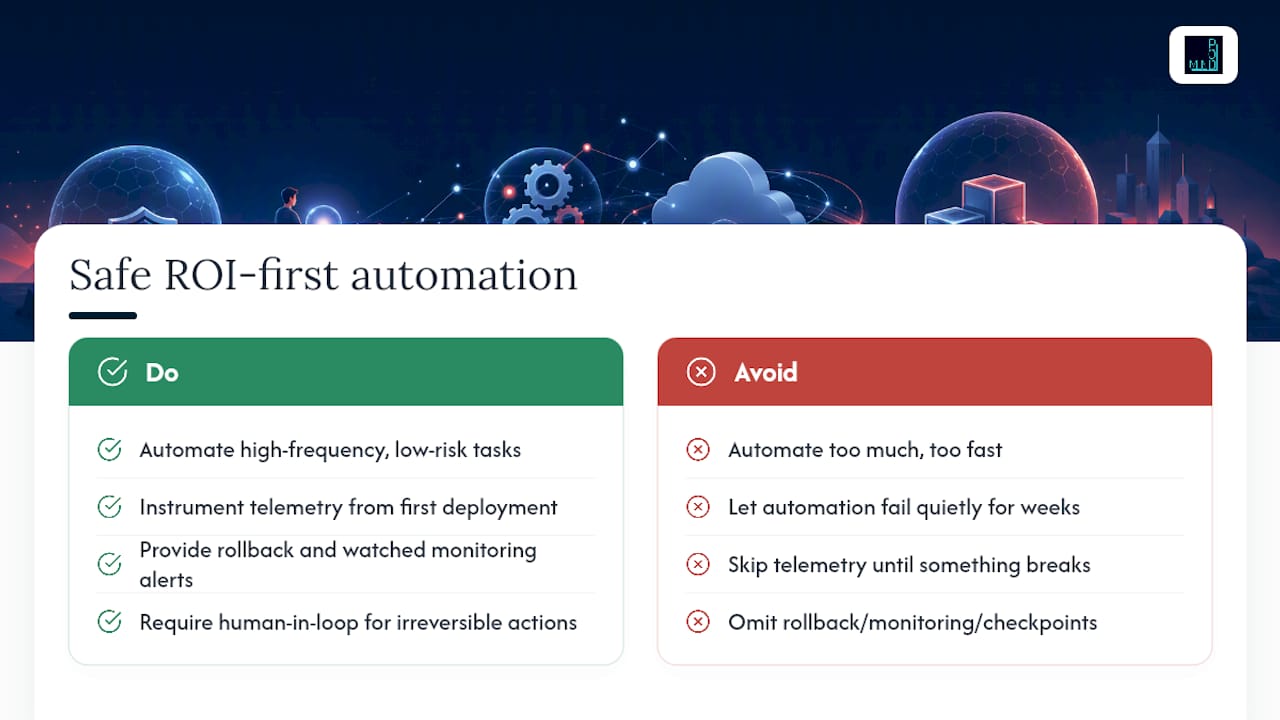
Every runbook we help stand up gets three non-negotiables: a rollback path, monitoring wired to an alert someone actually watches, and a human-in-the-loop checkpoint on anything irreversible. Automation that quietly fails for three weeks is a worse outcome than the manual process it replaced.
If you're deciding where to start, that's exactly the gap a free technology assessment is built to close.
— jaras
How Mindpod Technologies Helps You Run Runbooks Without the Guesswork
Building a working runbook is one thing. Keeping a fleet of them authenticated, monitored, and safe to run unattended for years is a different job, and it's the one most in-house teams under-resource. Mindpodtech's cloud architecture and cost optimization work covers exactly this gap: designing the runbook and Hybrid Worker topology correctly the first time, hardening identity and RBAC so a compromised token can't cascade, and setting up the Log Analytics pipeline so your audit trail outlasts the 30-day default instead of disappearing when you need it most.

For teams running autonomous IT operations at scale, MITB extends the same governance model, managed identities, monitoring, human checkpoints, across Microsoft, Entra, and Azure environments rather than one automation account at a time. Engagement starts the same way every time: a free technology assessment that maps your current runbooks and automation gaps against real risk and cost, then hands you a prioritized plan you own. From there, Mindpodtech can build it, secure it, or run it. Start with a free technology assessment to see where runbook automation actually pays off in your environment.
Key Microsoft Docs and Tutorials to Bookmark
For exact CLI syntax and the current runtime/version tables, keep these close: the Azure Automation overview, runbook types reference, runbook management guide, and runbook execution documentation. Microsoft updates these pages as runtime support changes, so treat them as the source of truth over any third-party summary.
FAQ
What Is the Pricing for Azure Automation Runbooks?
Cost scales with job runtime in the shared sandbox, any Hybrid Runbook Worker VMs you run continuously, and telemetry ingestion if you stream logs to Log Analytics. There's no flat subscription fee for runbooks themselves; you pay for to compute and diagnostics you actually consume.
What Is an Automated Runbook?
An automated runbook is a scripted workflow, written in PowerShell, Python, or a graphical designer, that Azure Automation executes on a trigger, whether that's a schedule, an API call, a webhook, or an alert, without manual intervention.
What's the Difference Between Azure Automation and Logic Apps?
Azure Automation runbooks are script-first and suit complex, code-heavy operational tasks like VM management or multi-step remediation, while Logic Apps are designer-first and excel at connecting SaaS services and simple conditional workflows. Many production environments use both together, with a Logic App triggering a runbook for the heavier scripted logic.
How Long Are Runbook Job Logs Kept?
Azure Automation keeps job logs for a maximum of 30 days by default. For longer audit trails, stream diagnostics to Log Analytics or a storage account through diagnostic settings.
Should I Use a System-Assigned or User-Assigned Managed Identity?
Use a system-assigned identity when one automation account handles one distinct workload, since it's created and removed automatically with the account. Use a user-assigned identity when multiple automation accounts or resources need to share the same permissions.