

AI for accounts payable automates invoice capture, matching, GL coding, approvals, and exception handling to cut cost-per-invoice and cycle time. Start with a focused pilot on your highest-volume invoice type, connect it to your ERP, define three to five measurable KPIs, and assign a single owner. That sequence gives you a working proof of value in eight to twelve weeks without betting the whole AP operation on it.
Where to start right now:
- Pick one high-volume, high-variance invoice type (utilities, freight, or professional services work well)
- Confirm your ERP connector and pull 90 days of historical invoices for model training
- Define pilot KPIs: cost per invoice, touchless rate, average cycle time, and exception rate
- Assign an AP lead and an IT contact before you talk to any vendor
Key Takeaways
AI for accounts payable delivers measurable ROI when the pilot is scoped tightly, KPIs are defined before go-live, and human-in-the-loop controls are built in from day one.
| Point | Details |
|---|---|
| Start with one invoice type | Pick your highest-volume, highest-variance invoice type for the pilot to maximize exception reduction and ROI signal. |
| Track five core KPIs | Monitor cost per invoice, touchless rate, cycle time, exception rate, and FTE hours saved from week one. |
| Vendor benchmarks are ceilings | Esker reports 70%+ fewer exceptions and AppZen claims ~80% of spend handled automatically; well-run SMB pilots typically land at 50–65% touchless in 90 days. |
| Governance is not optional | Supplier bank detail changes, segregation of duties, and a full audit trail must be in place before you scale. |
| Mindpodtech assessment first | Mindpodtech's free technology assessment maps your AP workflow, identifies the highest-ROI pilot, and produces an integration checklist you own. |
Table of Contents
- What "AI in accounts payable" actually means vs. classic RPA
- Key AI use cases in AP and what each one actually does
- How an AI-enabled AP system is actually built
- Business benefits and the KPIs to track in your pilot
- Step-by-step roadmap from pilot to full-scale deployment
- Risks, controls, and governance practices to plan for
- Vendor selection checklist and the questions that actually reveal fit
- Three realistic outcome examples from AP AI deployments
- How Mindpodtech approaches AI for accounts payable
- The part most AP AI guides won't tell you
- What Mindpodtech can do for your AP automation effort
- Sources
- FAQ
What "AI in accounts payable" actually means vs. classic RPA
Most AP teams have already touched some form of automation, usually rules-based robotic process automation (RPA) that clicks through screens and moves data between systems. AI is a different category of technology, and the distinction matters when you are choosing an approach.
AI-driven AP uses natural language processing (NLP), machine learning (ML), and computer vision to extract data from invoices in any format, predict the correct GL code from historical patterns, flag anomalies that don't match expected supplier behavior, and route approvals based on spend context. The system learns from every invoice it processes. Confidence scores improve over time, and the model can handle formats it has never seen before.
RPA and rules-based systems follow explicit, pre-written rules. They work well when invoice formats are fixed and volumes are low. The moment a supplier changes their PDF layout or a new vendor sends an XML file, the rule breaks and a human has to fix it.
The canonical AP automation flow runs: invoice ingestion → data extraction → matching and validation → approval routing → payment → reconciliation. AI handles the probabilistic, judgment-heavy steps (extraction, matching, coding, anomaly detection). Rules and policy logic handle the deterministic steps (approval thresholds, payment terms, segregation of duties).
- Prefer RPA/rules when: invoice volume is low (under 500/month), formats are fully standardized, and exception rates are already below 5%
- Prefer AI when: you process invoices from dozens of suppliers in varying formats, exception rates are high, or your team spends significant time on manual coding and matching
Key AI use cases in AP and what each one actually does
Forrester identify invoice capture, matching, GL coding, approvals, and analytics as the highest-priority AI use cases for AP teams. Here is what each looks like in practice.
-
Invoice capture and multi-format extraction. AI reads PDFs, scanned paper, email attachments, EDI files, and e-invoices (including Peppol-compliant formats) and pulls header and line-level data without a template. This matters because most mid-sized businesses receive invoices in at least four or five distinct formats.
-
Two-way and three-way PO matching. The system compares invoice lines against purchase orders and, for three-way matching, goods receipts. Line-level matching catches partial deliveries and quantity discrepancies that header-level matching misses entirely.
-
Non-PO invoice routing. For invoices without a purchase order (consulting, subscriptions, utilities), AI classifies the spend category and routes to the correct approver based on policy rules and historical patterns.
-
GL coding and allocation. ML models trained on your historical invoice-to-GL mapping suggest the correct account code with a confidence score. High-confidence suggestions post automatically; low-confidence ones go to a reviewer. Over time, the model's accuracy on your specific chart of accounts improves.
-
Approval routing with spend context. Instead of static approval matrices, AI-aware routing considers invoice amount, cost center, budget remaining, and supplier risk tier to select the right approver and escalation path.
-
Exception detection and semi-automated resolution. The system flags price variances, quantity mismatches, and missing PO references, then suggests a resolution action (contact supplier, request credit memo, approve with tolerance). A human confirms or overrides. This human-in-the-loop pattern is what keeps exception handling from becoming a black box.
-
Duplicate and fraud detection. AI checks for duplicate invoice numbers, identical amounts from the same supplier within a short window, and changes to supplier bank account details. Bank detail changes are one of the most common vectors for business email compromise fraud in AP.
-
Supplier communication automation. Status inquiry emails from suppliers get auto-replied with payment status pulled from the ERP. Overdue payment chasers go out on schedule. Suppliers get routed to a self-service portal for document uploads.
-
Payments orchestration and reconciliation. Some platforms extend into payment method selection (ACH, check, virtual card) based on supplier preference and early-payment discount availability, then auto-reconcile the bank statement against the AP ledger.
How an AI-enabled AP system is actually built
Understanding the architecture helps you ask better questions during vendor evaluation and avoid integration surprises six weeks into a pilot.
The component map looks like this:
- Ingestion layer: email inbox monitoring, API endpoints for supplier portals, EDI/XML feeds, and e-invoice network connectors
- Extraction engine: OCR plus document understanding models that go beyond character recognition to interpret invoice structure and context. AppZen's Autonomous AP, for example, claims to offer full invoice comprehension for coding and matching rather than simple field extraction
- Classification and matching engine: ML models that match extracted data against PO, receipt, and supplier master records
- Rules and policy layer: approval thresholds, tolerance bands, segregation of duties controls, and payment terms logic
- Workflow and orchestration: review queues, approval routing, escalation timers, and exception management
- ERP posting: validated invoices post to your general ledger via API or file export
- Analytics and monitoring: dashboards tracking touchless rate, exception rate, cycle time, and model confidence trends
ERP integration is where most pilots slow down. Common connectors cover NetSuite, Oracle Fusion, SAP S/4HANA, and QuickBooks. What integration actually requires depends on the ERP: NetSuite and QuickBooks typically connect via REST APIs with relatively short setup times; SAP and Oracle often need middleware or a certified connector and more IT involvement. Budget two to four weeks for integration setup in a typical SMB environment.
Data you need before go-live: 90+ days of historical invoices (ideally labeled with correct GL codes), a clean supplier master with current bank details, synchronized PO and goods receipt data, your chart of accounts, and your approval hierarchy.
Human-in-the-loop patterns are not optional. Every human correction feeds back into the model.
Deployment models:
- Cloud/SaaS: fastest to deploy, lowest upfront cost, vendor manages infrastructure. Best fit for most SMBs
- Managed AP-as-a-service: vendor handles operations alongside the software. Higher cost, but reduces internal resource requirements
- Hybrid/on-premise: relevant when data residency requirements or existing ERP architecture make full cloud deployment impractical
Business benefits and the KPIs to track in your pilot
The business case for AP automation AI rests on four levers: lower processing cost, faster cycle time, fewer exceptions, and better fraud detection. Field analysis from Naviant frames AI as improving control, visibility, and exception handling, with cost-per-invoice reduction and exception rate as the primary ROI drivers.
Primary benefits:
- Lower cost per invoice (labor, paper, postage, and error-correction costs)
- Shorter invoice-to-pay cycle, which enables early-payment discount capture
- Fewer exceptions requiring manual intervention
- Improved fraud detection, particularly for bank detail fraud and duplicate payments
- Better supplier relationships through faster, more predictable payment and automated status communication
- Improved cash flow visibility through real-time AP aging data
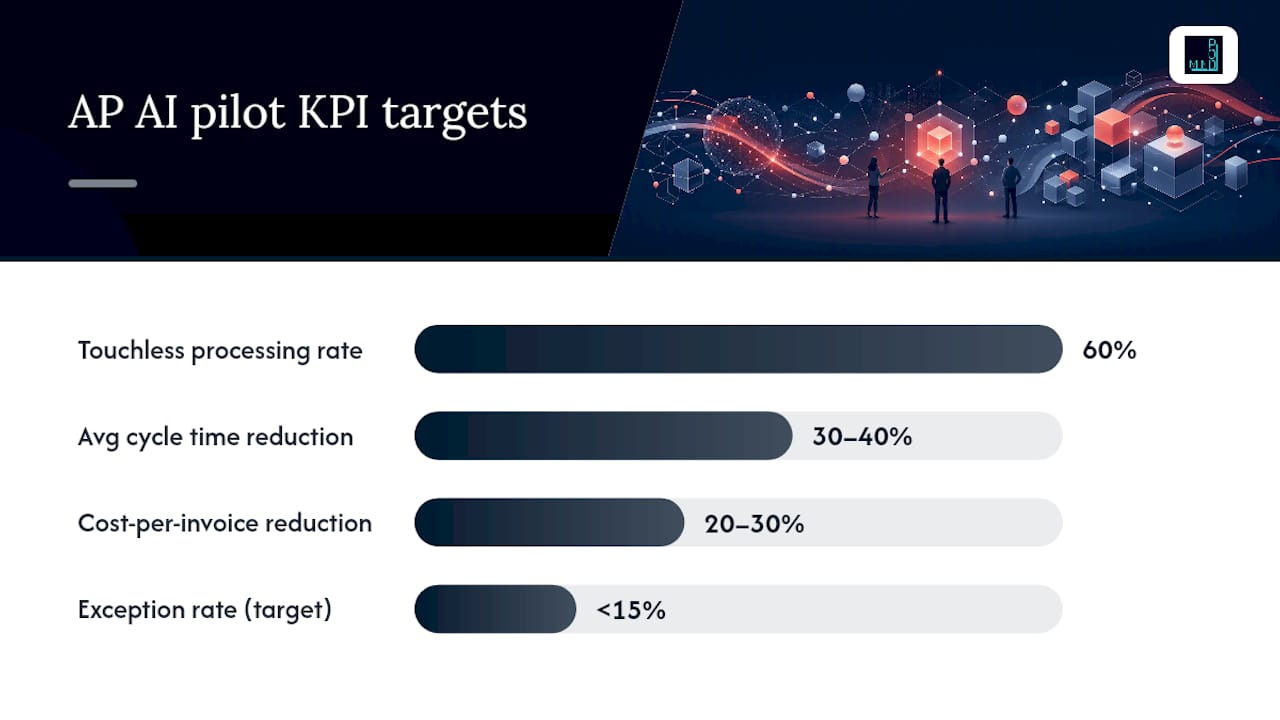
Pilot KPIs to track from day one:
| KPI | Definition | Suggested Pilot Target |
|---|---|---|
| Cost per invoice | Total AP processing cost ÷ invoice volume | Establish baseline; target 20–30% reduction |
| Touchless processing rate | % of invoices processed without human touch | 60% by end of pilot |
| Average cycle time | Days from invoice receipt to payment approval | Reduce by 30–40% vs. baseline |
| Exception rate | % of invoices requiring manual intervention | Target below 15% |
| FTE hours saved | Hours redirected from manual processing | Quantify in dollar terms for ROI model |
| Early payment discount capture | % of available discounts captured | Track improvement vs. pre-pilot baseline |
Esker reports vendor-stated outcomes of 70%+ fewer exceptions in specific deployments. AppZen claims up to approximately 80% of spend handled without human involvement in some client environments. Both are vendor figures, not independent audits, but they give you a realistic ceiling for what a mature deployment can achieve. A well-run pilot at an SMB typically lands moderate touchless rates within the first 90 days.
Building your ROI model: Start with your current cost per invoice (industry benchmarks for manual processing typically run $10–$15 per invoice for mid-sized organizations, though your actual number may differ). Multiply your projected touchless rate improvement by invoice volume and average labor cost per touch. Add early-payment discount capture as a revenue line. Subtract implementation cost and annual subscription fees. Most SMBs with 500+ invoices per month see payback within 12–18 months.
Step-by-step roadmap from pilot to full-scale deployment
A phased approach reduces risk and gives you real data to justify the next investment. Forrester recommends mapping AI pilots to the highest-volume, highest-variance invoice types first, which delivers the largest exception reduction and the quickest ROI signal.
Phase 1: Pilot scoping (weeks 1–2)
- Select one invoice type with high volume and high variance (freight invoices, utilities, or professional services are common starting points)
- Define success criteria: touchless rate target, exception rate ceiling, cycle time reduction goal
- Identify a supplier cohort of 10–20 suppliers for the pilot
- Confirm ERP connector availability and assign IT contact
Phase 2: Data preparation (weeks 2–4)
- Pull 90+ days of historical invoices for the selected type and label a sample with correct GL codes
- Clean the supplier master: verify bank details, tax IDs, and payment terms
- Sync PO and goods receipt data to the AP platform
- Export your chart of accounts and approval hierarchy
Phase 3: Technical setup (weeks 3–6)
- Configure the ingestion layer (email alias, API endpoint, or portal)
- Set up ERP connector and test round-trip posting with sample invoices
- Configure business rules: approval thresholds, tolerance bands, segregation of duties
- Set initial confidence thresholds and review queue routing
- Run parallel processing for two weeks: AI processes invoices alongside your existing workflow so you can compare outputs without risk
Phase 4: Change management (weeks 5–8)
- Train AP staff on the review queue interface and exception resolution workflow
- Communicate SLA changes to approvers (faster routing means faster expected response)
- Notify the pilot supplier cohort of the new submission channel
- Establish a weekly review cadence to assess KPIs and model performance
Phase 5: Scale (weeks 9–16+)
- Expand to additional invoice types and supplier cohorts
- Add languages or legal entities if applicable
- Tighten confidence thresholds as accuracy data accumulates
- Automate reconciliation for the payment types covered in the pilot
Typical resource commitment for an SMB pilot:
| Role | Time Commitment | Responsibility |
|---|---|---|
| AP lead | 4–6 hrs/week | KPI tracking, exception review, supplier communication |
| IT/integration contact | 8–12 hrs (setup) + 2 hrs/week | ERP connector, ingestion config, security review |
| Vendor implementation | Vendor-managed | Platform config, model training, go-live support |
| Project manager | 2–3 hrs/week | Timeline, stakeholder updates, risk log |

Risks, controls, and governance practices to plan for
Scaling AI in AP without governance controls is how organizations end up with auto-approved fraudulent invoices or a model that quietly drifts off course. Naviant's field analysis notes that organizations expecting wholesale replacement of AP staff are misaligned: the best outcomes come from augmenting teams with AI while keeping human control for approvals and exceptions.
Operational risks:
- Model drift: the model's accuracy degrades as supplier formats, product categories, or GL structures change. Schedule quarterly model reviews and retrain on recent data
- Poor data quality: a dirty supplier master or unsynchronized PO data produces matching errors from day one. Data preparation is not optional pre-work
- Over-automation of critical approvals: high-value invoices and any invoice involving a bank detail change should always require human review, regardless of confidence score
Security and compliance:
- Verify that the vendor holds SOC 2 Type II certification and, if your data residency requirements demand it, ISO 27001
- Confirm encryption in transit (TLS 1.2+) and at rest (AES-256 or equivalent)
- Supplier bank detail changes must trigger a mandatory human verification step. This is the single most important fraud control in AP
- Maintain a full audit trail: every extraction, match decision, approval, and override must be logged with timestamp and user ID
Governance controls:
- Segregation of duties: the person who approves an invoice must not be the same person who can modify supplier bank details or payment terms
- Approval thresholds: define dollar-amount tiers that require escalating levels of human approval regardless of AI confidence
- Explainability: require the vendor to show why the model made a specific coding or matching decision. A system that cannot explain its outputs is a compliance liability
- Human review gates: never remove the review queue entirely. Even at high touchless rates, a sample audit of auto-processed invoices should run monthly
Vendor management risks:
- Confirm uptime SLAs (99.5% or better for a production AP system)
- Clarify data retention and deletion policies before signing
- Understand third-party subprocessor relationships and where your invoice data physically resides
Vendor selection checklist and the questions that actually reveal fit
Most vendor demos look impressive. The questions below are designed to surface integration complexity, real-world accuracy, and support quality before you commit.
Evaluation dimensions:
- Primary use cases supported (capture only? matching? GL coding? approvals? payments?)
- ERP connectors available and certification status (native vs. middleware vs. file-based)
- Deployment model (cloud SaaS, managed service, hybrid)
- Human-in-the-loop handling: how are exceptions surfaced, and how do corrections feed back into the model?
- Security certifications: SOC 2 Type II, ISO 27001, data residency options
- Pricing drivers: per-invoice fee, per-user seat, subscription plus implementation, or a combination
- Best-fit company size: some platforms are built for enterprise volumes and carry implementation costs that don't make sense for an SMB processing 1,000 invoices per month
Questions to ask every vendor:
- Walk me through the exact steps and timeline to connect your platform to [your ERP]. What does my IT team need to do?
- What is the average touchless processing rate your customers achieve in the first 90 days, and what is the range?
- What happens when the model is wrong? Show me the exception workflow and how a correction improves future predictions.
- How do you handle supplier bank detail changes? Is there a mandatory human review step?
- What does your audit trail look like? Can I export it for an external auditor?
- What is your uptime SLA, and what is your support response time for a production outage?
- What data do you retain after contract termination, and what is your deletion process?
Evaluating total cost: Add subscription fees, implementation and onboarding fees, per-invoice fees at your expected volume, and internal IT time for integration. Compare that total against your current annual AP processing cost (staff time + error correction + late payment penalties). The ratio gives you a realistic payback period.
Named platforms to evaluate: HighRadius offers a broad AP automation suite with strong ERP connectors and enterprise-grade ML for coding and matching. Rillion (formerly Palette Software) focuses on invoice processing and approval workflows with a track record in mid-market environments. Both support common ERP integrations and carry SOC 2 certifications.
Pro Tip: Before signing any contract, require a proof-of-value engagement using a real sample of your invoices, ideally 200–500 from the invoice type you plan to pilot. A vendor confident in their accuracy numbers will agree. One that resists should tell you something.
Three realistic outcome examples from AP AI deployments
These examples reflect outcomes reported in vendor case studies and field analyses. Results vary based on invoice volume, data quality, ERP complexity, and team readiness. Treat them as directional benchmarks, not guarantees.
-
Regional distributor, ~1,200 invoices/month. Deployed AI invoice capture and three-way PO matching connected to NetSuite. Within 90 days, the team reported a touchless rate above 55% for PO-backed invoices and a measurable reduction in time spent on exception resolution. The AP team of three redirected roughly one full day per week from data entry to supplier relationship management and discount negotiation.
-
Professional services firm, ~400 invoices/month, mostly non-PO. Implemented GL coding automation trained on 18 months of historical data. Coding accuracy on high-confidence suggestions exceeded 90% within 60 days. The firm's controller estimated a 25–30% reduction in time spent on month-end coding review, though the overall touchless rate stayed lower (around 40%) because non-PO invoices inherently require more judgment.
-
Multi-entity manufacturer, ~3,500 invoices/month across four legal entities. Phased rollout starting with one entity and one invoice type. After four months, exception rate dropped from approximately 22% to below 10% for the pilot entity. Scaling to the remaining entities took an additional six months due to ERP complexity and chart-of-accounts differences across entities.
Each of these outcomes required clean supplier master data before go-live, active AP team involvement in the exception review queue during the first 60 days, and a vendor with a responsive implementation team. None of them happened on autopilot.
How Mindpodtech approaches AI for accounts payable
Mindpodtech's methodology for AP AI engagements follows the same phased logic described throughout this guide: assess first, build a prioritized roadmap the client owns, pilot with real invoices, then scale with monitoring and rollback controls in place.
The engagement starts with a free technology assessment that maps your current AP workflow, identifies the highest-ROI automation candidates, and surfaces integration constraints before any vendor is selected. The output is a plain-language plan with specific pilot KPIs, an integration checklist, and a realistic timeline, not a vendor pitch.
What Mindpodtech brings to an AP AI engagement:
- Fractional technology leadership to own the vendor evaluation and integration process when your internal IT capacity is limited
- Agentic AI strategy and governance to design human-in-the-loop checkpoints, confidence thresholds, and audit trail requirements from day one
- Custom workflow integration when your ERP or approval process doesn't fit a standard connector
- Production monitoring and rollback planning so the pilot doesn't become a liability if model performance degrades
The approach is deliberately practical: find where AI creates measurable leverage in your AP process, build it into the tools your team already uses, and ship to production with controls in place. No six-month implementation before you see a result.
The part most AP AI guides won't tell you
Those numbers are real in the right conditions. What they don't emphasize is that those conditions require clean data, a disciplined pilot, and an AP team that actually engages with the exception queue instead of treating it as someone else's problem.
The organizations that get the best outcomes from AP AI are not the ones that automate the most. They are the ones that define clear human-in-the-loop boundaries, measure KPIs weekly during the pilot, and resist the pressure to expand scope before the first use case is stable.
The other thing worth saying plainly: AI does not eliminate the need for AP expertise. It changes what that expertise is applied to. The AP professionals who thrive after an AI deployment are the ones who shift from data entry and exception firefighting to supplier strategy, discount negotiation, and cash flow optimization. That is a better use of their time, and it is a better outcome for the business.
What Mindpodtech can do for your AP automation effort
Most AP teams evaluating AI automation face the same problem: the enterprise platforms are built for companies ten times their size, and the lightweight tools don't connect cleanly to their ERP or handle their invoice volume without constant babysitting.

Mindpodtech closes that gap. The free technology assessment maps your current AP workflow, identifies your highest-ROI pilot candidate, and produces an integration checklist and pilot KPI plan you own outright. From there, Mindpodtech can lead the vendor evaluation, manage the ERP integration, design the governance controls, and run production monitoring so your team isn't left holding a system they don't fully understand.
No retainer lock-in before the assessment. No vendor kickbacks. Just a prioritized plan and the option to engage further if it makes sense. Request your free AP technology assessment and get a plain-language roadmap within two weeks.
Sources
The sources below back the claims in this guide and are worth reading directly for deeper technical or vendor-specific detail.
- Top AI Use Cases For Accounts Payable Automation In 2025
- AP Automation Software | AI-Powered Accounts Payable | AppZen
- Accounts Payable Software | Esker AP Automation
FAQ
What is the best AI software for accounts payable?
HighRadius and Rillion are two well-regarded platforms covering invoice capture, matching, GL coding, and approval workflows, with ERP connectors for NetSuite, SAP, Oracle, and QuickBooks. The best fit depends on your invoice volume, ERP, and whether you need a full AP suite or targeted automation for a specific step like coding or matching.
Is there a ChatGPT-style AI tool for accounting?
General-purpose large language models like ChatGPT are not purpose-built for AP automation and lack the ERP integrations, audit trails, and document understanding models that production AP workflows require. Purpose-built AP AI platforms (such as AppZen, Esker, HighRadius, or Rillion) are designed specifically for invoice processing, matching, and compliance.
Is there a free AI tool for accounts payable?
Most production-grade AP AI platforms are paid SaaS products. Some vendors offer free trials or proof-of-value engagements using a sample of your invoices. Mindpodtech offers a free technology assessment that maps your AP workflow and identifies your highest-ROI automation candidates before any software purchase.
Can AI fully take over accounts payable?
Best practice keeps human review gates for high-value invoices, supplier bank detail changes, and low-confidence model decisions. The goal is augmentation, not replacement.
How long does an AP AI pilot typically take?
A focused pilot covering one invoice type and one supplier cohort typically runs eight to twelve weeks from data preparation to go-live, with meaningful KPI data available by week ten. Scaling to additional invoice types and entities adds three to six months depending on ERP complexity and data readiness.